

👋 Hey, I’m Nikki. Each week I write about UX research strategy, communicating impact, and using AI to do your best work. For more: Claude Skills Bundle | Claude Agents | AI Prompt Library | Team Training | AI Courses for UXRs
P.S. Paid subscribers get access to full archive, all content, a private Slack community, Substack lives, and a hub of templates, scripts, and mini-courses
I’m so excited to be launching CoworkOS, a research operating system for Claude, which helps you set up folders, skills, documentation, agents, scheduled tasks, and MCPs, so you can dive into Claude doing your best work.
It can sometimes feel like every AI guide out there is geared toward everyone else but user researchers, which starts to feel a tad annoying and frustrating, especially since we’re usually given very little guidance for how to use AI in our workflows. It reminds me of “The Way Back When.” Before there were articles upon articles on how to write research plans or create personas. When best practices were kept solely within teams (or individuals) and not widely accessible via Google.
Back when my journey maps and personas looked like this:


Ah, the good old days.
So, after working for coming up on years now (omg) in Claude, I wanted to create a guide on Claude Cowork geared toward user researchers that helps you determine how to use Cowork in a way that makes AI feel more useful and efficient.
If you’re completely new to Claude, I recommend first checking out my Claude 101 for user researchers as it goes over the fundamentals for understanding Claude before diving into Cowork.
What is Cowork?
There are three ways you can work with Claude:
Chat: Having a conversation with Claude about a particular topic
Cowork: Doing a task (or a set of tasks) with Claude
Code: Creating dynamic deliverables with Claude
When it comes to research, Chat and Cowork will typically be your most used methods. The times when I tend to use Code are when I need something very dynamic, such as making a deliverable that has a lot of different layers that need coding or creating a presentation in the form of an interactive website.
With Chat, the way I look at it is a planning partner. You talk through a particular topic to sharpen your perspective on it, to think through the potential gaps, to brainstorm the best way to tackle a problem, and you move on to Cowork when you want to actually get things done.
For example, I was recently given a (very vague) project brief for a research study. I used Chat to essentially chew on the brief by brainstorming what it was the client was actually trying to achieve, what might be important to them, what perspectives I was missing, and what gaps were in the brief that needed to be addressed ASAP before moving forward. Essentially, it is to brainstorm.
I then moved over to Cowork when it was time to do actual tasks like creating the research plan, the screener survey, the discussion guide.
Cowork enables you to do tasks with Claude, rather than just have a chat or brainstorm because it can produce solid deliverables (as long as you train it well - more on that later).
What tasks are suited for Cowork?
Because Cowork is more geared toward doing and completing tasks, it’s important to think through which tasks tend to be better suited for Cowork. I think about Cowork tasks, specifically, in three different buckets:
A task that takes several steps. I think of this as gathering, comparing, drafting, and formatting tasks. For example, if we wanted to triage a month of support tickets into themes with direct quotes pulled and format this into a one-pager, Cowork could handle those several steps for you much quicker than you would be able to.
A task that is within files on your computer. Cowork can read files already in your folder, edit them, and save changes back, which Chat can’t do. Cowork works on files you already have and can easily pull information from them. For example, if you are working on a Research Roadmap, you can input team metrics and information, potential research gaps, and notes from meetings you had with stakeholders into one folder, which Cowork could then read and help you create a research roadmap.
A task that has several tools involved. If you have interview notes in a folder, several Slack conversations on a project, transcripts of stakeholder meetings in Zoom or Granola, and you want to create an affinity diagram that takes all of this into account, Cowork can look across those files and tools, and create something in Miro based on that information.
Again, Cowork is there to help you with tasks, not to do them for you. Ideally, your workflow looks like a partnership where you are working together on the tasks, giving Claude enough context (we will get to that later) and co-creating rather than just handing everything off. Which takes me to my next point…
What should I hand off to AI?
I wrote an entire article (with an accompanying Miro board to help you) on how to determine which of your tasks are best to keep as yours and to hand over to AI, so I won’t go into explicit detail here, but I will quickly recap how I think about separating tasks.
I’ve found that AI is very good at mechanical work and very bad at judgement, so the job is to sort your work along that line and hand off only the mechanical side.
Mechanical work is stable, rules-based, and produces a repeatable output. If I gave the same task to five competent people with the same instructions, I’d get five nearly identical results. There are three signs I look for:
It repeats. I do it over and over, study after study.
It follows the same rules each time, so the steps don’t change based on who the participant was or what mood the room was in.
The output is something I could write down as instructions, a format, a checklist, or a template.
Formatting a discussion guide into your team’s standard layout is mechanical. Tagging transcripts against a taxonomy you’ve already defined is mechanical. Turning a set of criteria into a screener is mechanical.
Judgement work is context-dependent and needs your read of the situation. It calls on empathy, experience, and the ability to notice what a rule can’t capture. The three signs are:
It needs context that lives in your head or in the room, not in a procedure.
It needs your interpretation, your point of view, your sense of what matters here.
It changes every time, since the right call depends on things that are only true this once.
Typically, judgement type tasks start with the word decide. Decide what an insight actually means, decide who is most important to speak to for a study, decide if a research study is worth conducting.
So, with the three buckets above and the mechanical versus judgement tasks, you can discern which tasks you might want to hand off to AI versus those you want to keep. Some of my favorite mechanical tasks to hand off are those I have templatized in the past like:
Building the first draft of a screener survey based on participant criteria
Building the first draft of a research plan based on meeting notes
Building the first draft of a discussion guide
Using a “so-what” checker to see if my insights would matter to a stakeholder
Using “stakeholder empathy maps” to understand what my stakeholder’s needs are and turning those into potential projects
As you can see, whenever I am building with AI, it is always a first draft. Because, no matter how much we train it, AI will miss things, hallucinate, and not always complete a job up to our standards (thank goodness), so it is always co-creation when it comes to using AI.
A quick note on deeply understanding your craft
I am very lucky to have 13 years of experience in user research at this point. I have done research “the manual way” for the majority of my career, including painstakingly transcribing my own research interviews for years. I know my craft pretty darn well so I don’t need AI to do it.
The best thing you can do is distill your knowledge into AI, and we will talk about how to do that later, because, when we use AI, we should not be using it for AI’s capability but using AI to strengthen and make our capabilities more efficient. AI is not ideal at generating things from scratch (trust me, I’ve tried), and is best used based in your knowledge and capability.
So, if you aren’t sure how to do something, let’s say like card sorting, don’t rely solely on AI to teach you how to do that. Do research by looking up articles, watching videos, reading books, and practicing without AI before leaning too heavily on a machine that is purely a predictive text mechanism.
How to set up Cowork
Let’s dive into the nitty gritty now of how to set up Cowork as a user researcher. First off, let’s look at the logistics of where Cowork actually lives and what the basics mean.
Claude Cowork basics
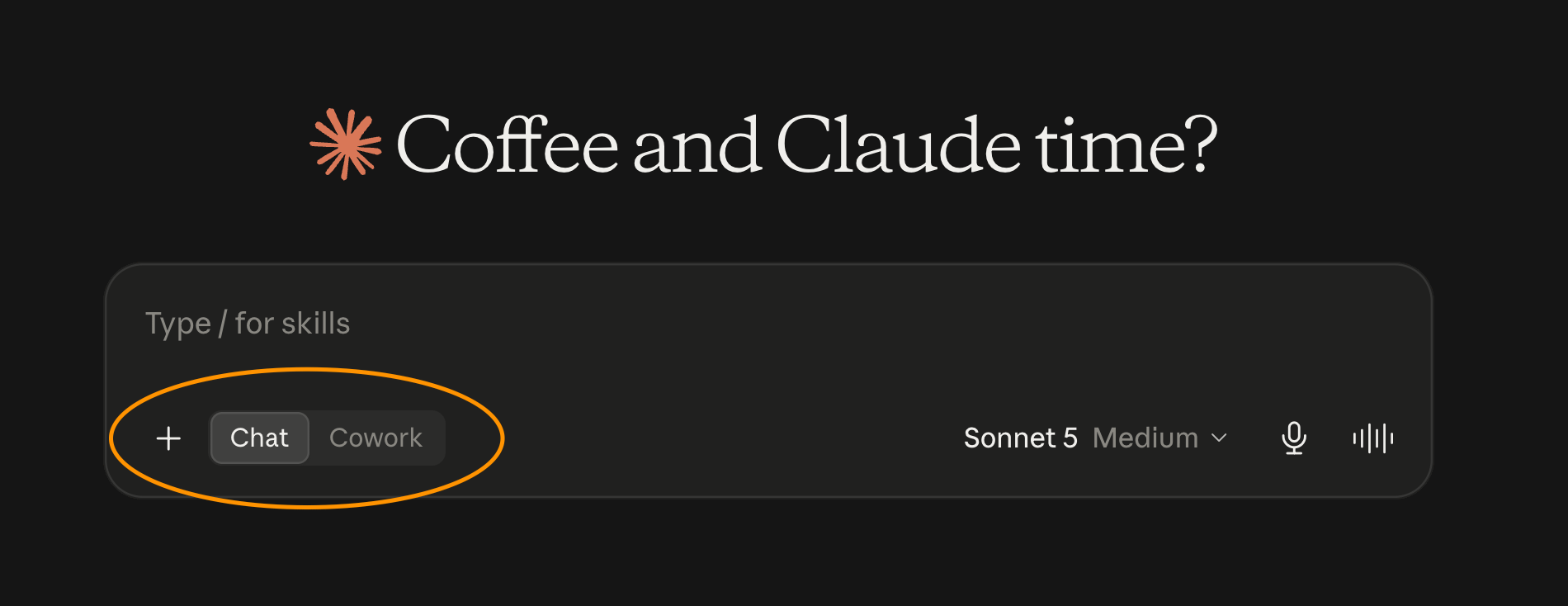
As of right now (and this literally changes too often), when you start a new chat, you can choose between Chat and Cowork.
And when you click on Cowork, a few different options appear, as you can see below, and we will go through them each.
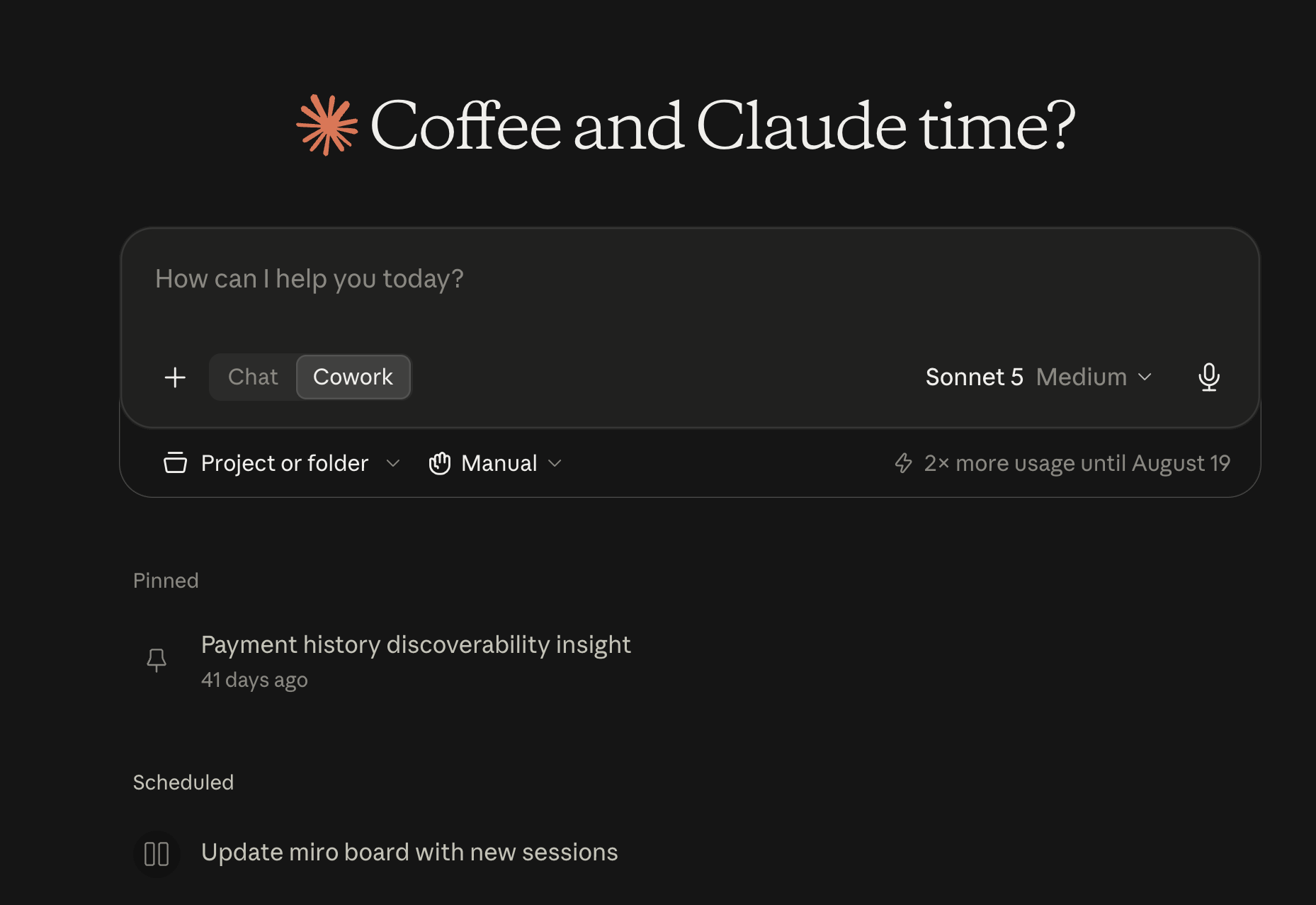
Project or Folder
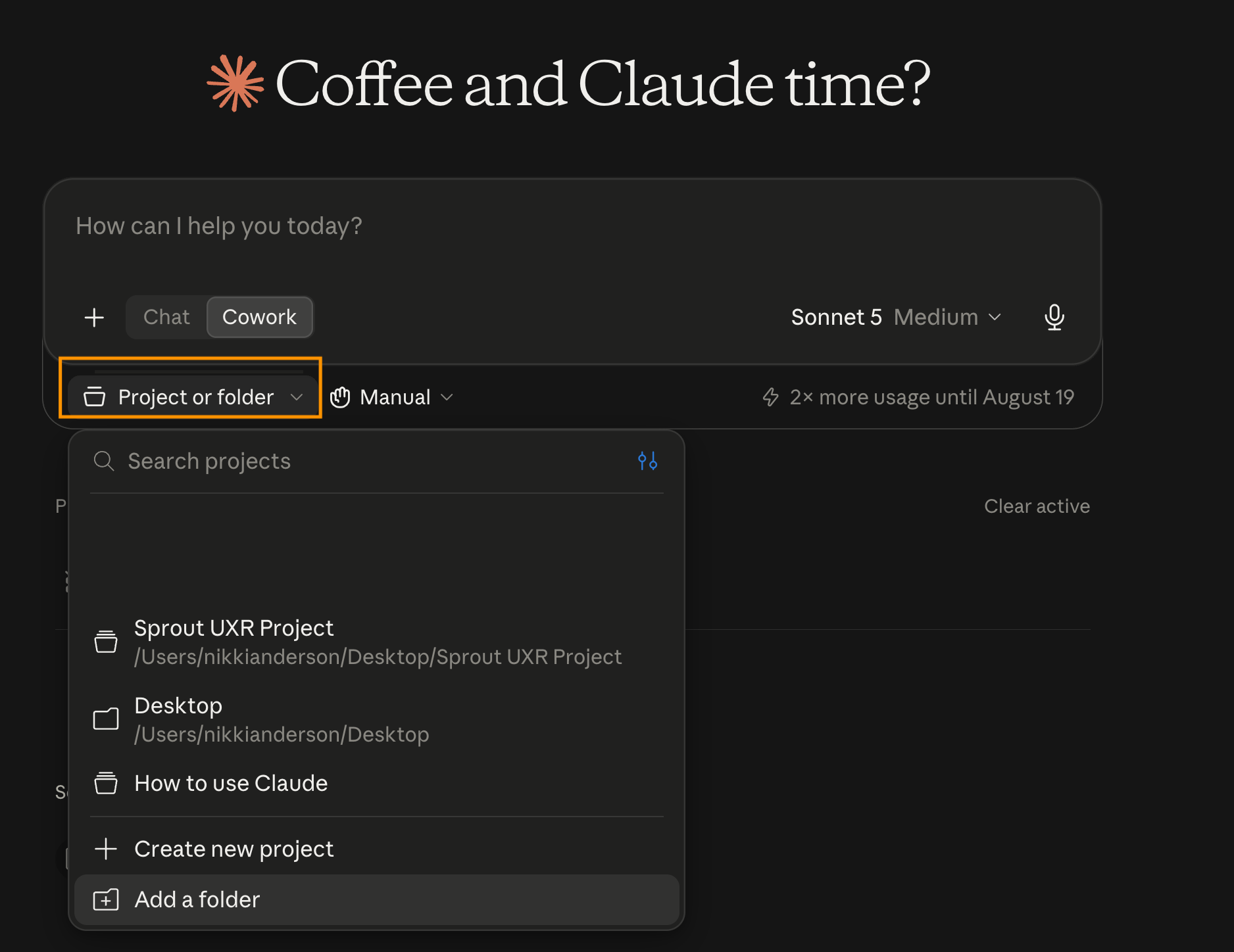
This is where you tell Claude what it can look at so, when you are starting somewhere new, you are able to give it a lot more context than just starting from scratch.
A folder is one folder on your computer that Claude can read and write in for this one task. A project is a saved workspace that has its own instructions, its own folder or folders, and its own memory that builds up over time. I go into projects more in-depth later, but the way I tend to distinguish the two is that using a folder is for one piece of work where I need to share a lot of context versus a project which is a piece of work I keep coming back to.
If you skip this and just start typing, Claude has no access to any of your files at all, which means you are back to extra steps.
Permissions
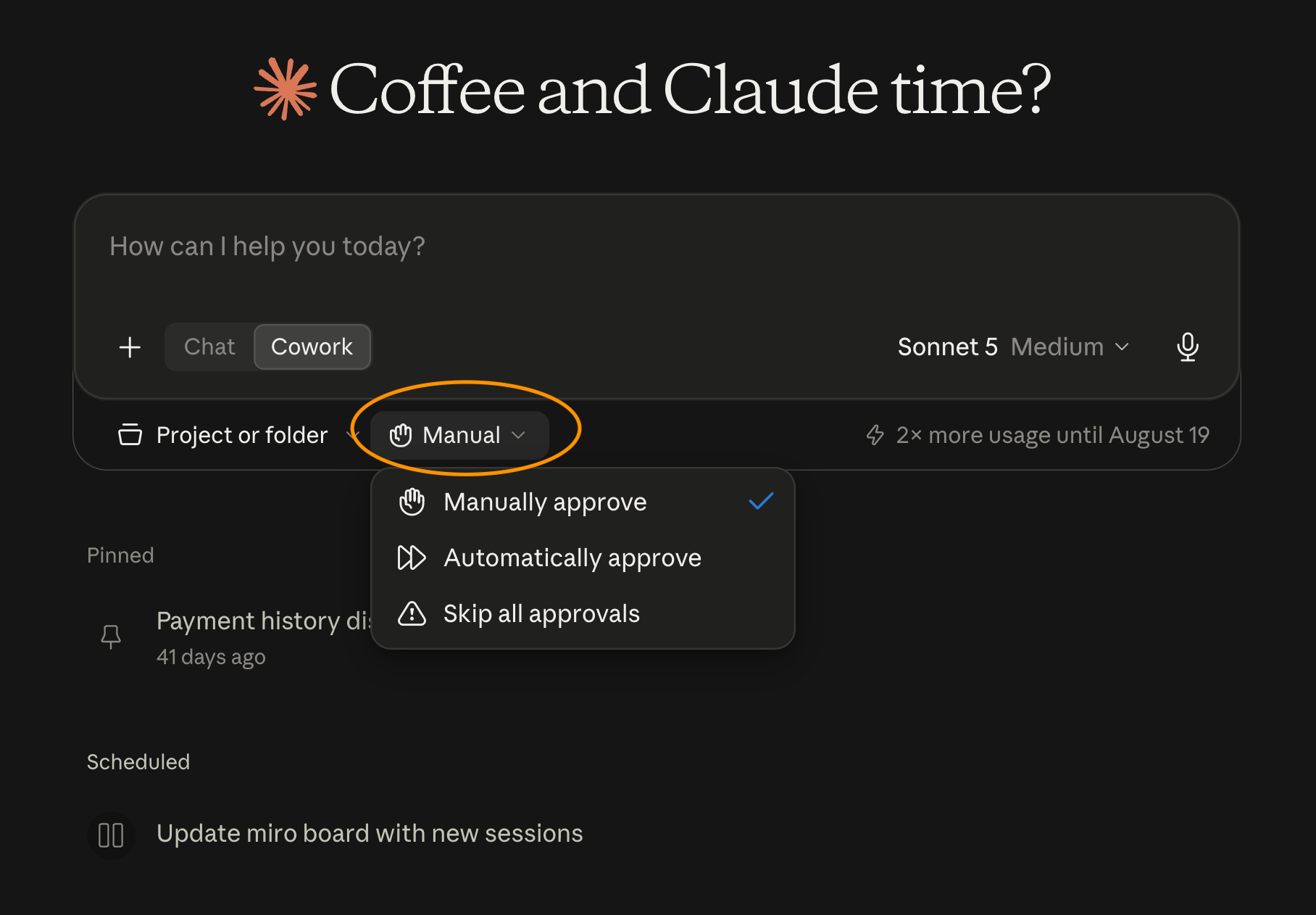
Cowork has three approval models:
Manually approve: Claude stops and asks you before it takes an action, so you are clicking yes or no as it works. This is the slowest option, and sometimes a pain when you go to do something else and realize Claude has been waiting for your approval, but it is the safest bet and the one I default to when I’m running a new task
Automatically approve: Claude keeps working without stopping to ask, which is faster and less annoying. With this mode, you are reviewing the result without it asking your permission for every step. I only use this for tasks I have already run a few times and trust
Skip all approvals: Claude works without stopping at all. I never use this because I simply don’t trust AI enough, or know enough about the backend to feel comfortable simply skipping all approvals. By skipping this, I can’t understand what Claude is doing and that gives me the shivers
One thing that is great is that Claude will always ask you before it permanently deletes a file, so huzzah to Claude for that!
I also recommend you actually read the confirmation when it pops up instead of clicking through it. Most of the mistakes I have made with this is when I am lazy and not actually reading what I’m approving (which then why even have it ask, right?!). Plus you get to learn more about what Claude is actually doing when you read through the confirmations and this teaches you more about the model.
Models
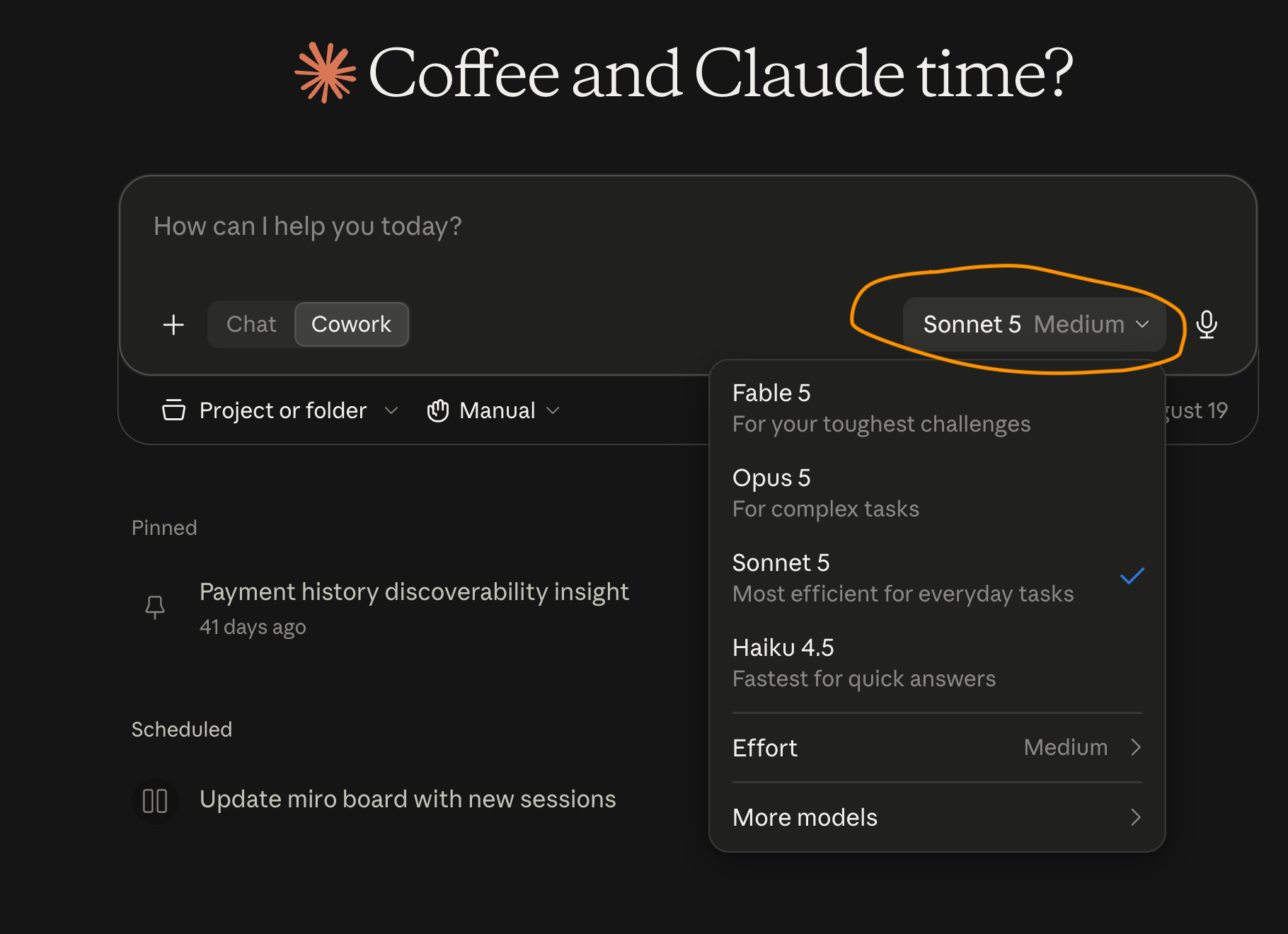
As of writing there are four main models you can use, and they go from most capable to fastest: Fable 5, Opus 5, Sonnet 5, and Haiku 4.5. Names and availability change constantly and what you see in your picker depends on your plan, so yours may look slightly different.
Fable 5 is the most capable and the most expensive, and I actually rarely use it just because it feels like it’s not THAT much better (at least not yet) than Opus. So, to be honest, I never really use this.
Opus 5 is super capable at more heavy-intensive work, and especially working in a project across multiple files. I tend to use it for:
Reading a whole study folder and telling me what’s in there, how the documents relate, and what surprised it
Tagging transcripts where the tagging needs judgement rather than a fixed taxonomy
Clustering tags into themes across a whole study, where it needs to hold every transcript at once and see what connects
Working out what a contradictory set of findings actually means, so where two participants said the same words and meant completely different things
The first draft of a report where the structure is carrying the argument
Pressure testing my insights before a readout, so a proper so-what check where I want it to be hard on me
Pulling across several studies at once, like a quarterly roundup or a repository review
Building a skill with me, since that conversation needs it to push back on my vague answers
Sonnet 5 is fast and I use it for volume work where the rules are already set:
Tagging transcripts against a taxonomy I’ve already defined
Summarizing individual sessions into my standard post-session format, one after another
Reformatting a guide or a report into our template
Turning participant criteria into a first-draft screener
Drafting participant comms from a template, so confirmations, reminders, thank yous
Anonymizing a folder of transcripts
Writing a research brief from a messy intake request
Drafting a discussion guide from a brief
Drafting a topline report
Haiku 4.5 is the fastest and cheapest and I use it for the properly mechanical stuff:
Renaming and reorganizing files
Pulling every quote that matches an exact instruction
Quick checks, like “does every transcript in here have a consent form”
Converting a file from one format to another
Context windows are really important here because they determine how much material a model can hold at once. Fable, Opus, and Sonnet all hold around a million tokens, while Haiku holds about 200,000. In research terms, an hour-long interview transcript runs roughly 8,000 to 10,000 words, so the bigger window models will comfortably take a full study plus your context documents plus two or three past reports for the format reference. Haiku will start dropping things well before that. So even when the task is mechanical, if it needs to look across a lot of files at the same time, I move beyond Haiku.
The way I judge which model to use is that if the task has one right answer. If there is one answer and I can write the steps down, I go with Haiku. If Claude has to hold a lot at once and reason across it, go with Sonnet or Opus.
If you’re on a plan with usage limits this gets really important (and annoying), since running everything on Fable will chew through your capacity extremely fast. I tend to start heavy for the thinking work and drop down when I get to polishing. You can switch models mid-task, so, for example, you can synthesize on Opus and then flip to Sonnet to format the output.
To dictate or type
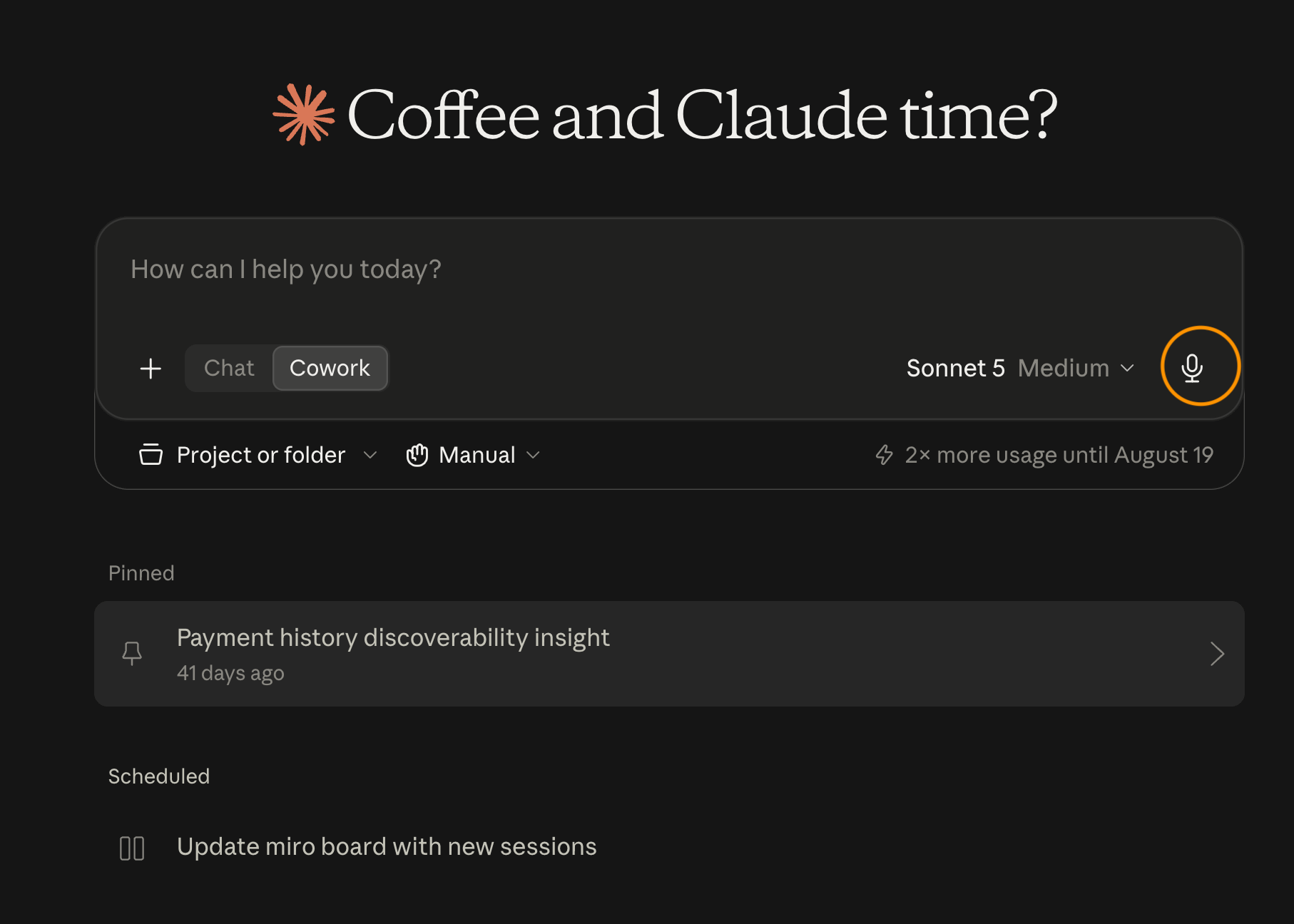
I dictate almost everything I put into Claude, using Wispr Flow; you can use my link to get a free month of pro! (not sponsored, just love the app).
When I speak a prompt I give far more context than when I type one. With typing I’m like “ugh, I don’t want to be typing, here’s the shortest way for me to say this.” Whereas, when I dictate, I tend to overexplain and give even more context so much more easily. This is super helpful when I need to give context and answer Claude’s clarifying questions, which actually benefit from me rambling and thinking out loud.
I also use it to work through problems when brainstorming because I end up coming up with different ideas and solutions just through talking through something. I also use it a lot in my fiction writing to work through what feels like mundane dialogue or tougher parts of my story that feel flat!
Build your context
Context is the most important part of working with any AI tool. Without context, AI is pretty dang useless, and it creates situations that cause all the exasperations of “AI is dumb” or “I have to quadruple check it” or “it produced a load of garbage again!”
While AI can still produce dumb garbage with context, it is less likely to. And that context allows us to use AI in a way that is much more efficient and effective.
I hate to say that the downside of this is that setting it up takes time and effort, however, I can confidently say that without setting it up, you will spend a whole lot more time and effort continuously correcting Claude and debating whether or not to throw your computer out the window.
The first thing that I did when setting up Cowork more properly was to create a folder that includes the following four documents in it. With this, I can connect each project to this folder so Claude has complete background context of the things I tend to need to explain over and over again.
The fastest way to do this is to have Claude interview you rather than starting from a blank page trying to write this. I have included both a prompt and an example output that you can copy and paste to speed up this process for each step.
About me and my role
You about me and my role document is all about you, and includes the relevant information about your working preferences, you can also include your writing style, and what you do within your role to give Claude context on you.
The prompt:
I want to build a context document about me as a user researcher, so that you understand my role and how I work without me re-explaining it every time.
Interview me one question at a time until you have enough to write it. Ask me about: my job title and how long I’ve been doing this, where I sit in the organization and who I report to, which teams I work with, what I’m actually responsible for, what I’m measured on in performance conversations, and what my working preferences are (how I like drafts delivered, what format I want, what I never want to see).
Push me hardest on two things. First, what I’m measured on, because I’ll probably answer with what I do rather than what I’m judged on. Second, what I’m NOT responsible for, since knowing where my authority stops matters as much as knowing where it starts.
Don’t write anything until you’ve finished asking. When you’re done, write the document, then tell me what you still don’t know about me.
This is the output you will get from this prompt:
# About me

## My role
I'm a [job title] at [company]. I've been in user research for [number] years.
I sit within [team or department] and report into [role].
I work with [number] product squads: [list them].

## What I'm responsible for
- [e.g. All generative and evaluative research for the [X] product area]
- [e.g. Maintaining the research repository]
- [e.g. Running our participant panel]
- [e.g. Coaching [team] on running their own discovery calls]

## What I'm measured on
[e.g. Research influencing roadmap decisions, not the number of studies I run.
My performance conversations focus on X, Y, Z.]

## How I like to work
- I lead with the recommendation and put the evidence after it
- I attach participant IDs to every claim I make
- I want to see a markdown draft before any final document gets created
- I write in [British/American] English
- I don't use [the words, formats, or structures you dislike]
- My deliverables are usually [briefs, guides, synthesis docs, reports, readout decks]

## What I don't do
- [e.g. I don't own analytics, that's the data team]
- [e.g. I don't run the design critique, I contribute to it]
- [e.g. I don't have final say on the roadmap, I inform it]
My organization
This document talks about the organization you work in and essentially the world in which your research works in, which includes yhe business, customers, the product, what leadership is anxious about this year, and (most usefully) all the internal language your company uses that would mean nothing to an outsider. It's the document you'd hand a new researcher on day one so they could follow a stand-up.
The prompt:
I want to build a context document about my organisation, so that you understand the business I work in without me explaining it at the start of every task.
Interview me one question at a time until you have enough to write it. Ask me about: what the company does and who our customers are, what the product actually is and what its main journeys are, what the business is prioritising right now and which metrics leadership watches, and how the research function sits in the organisation.
Then spend a proper chunk of the interview on our internal shorthand. Ask me to list every acronym, internal product name, team name, and phrase that people here say constantly and an outsider wouldn’t understand. Keep asking “what else do you say that you’d have to explain to a new starter” until I run out. For each one, get me to tell you what it actually means rather than only what it stands for.
Don’t write anything until you’ve finished asking. When you’re done, write the document, then tell me what you still don’t understand about how this business works.
What it produces:
# My organisation

## What we do
[Company] [does what, for whom]. Our customers are [describe them: segments,
size, whether they're the buyer or the user, anything that changes how we research them].

## The product
[Describe the product in the way you'd describe it to a new researcher on day one.
Include the main surfaces, the core user journeys, and what's currently being built.]

## What matters to the business right now
[e.g. This year the priority is [X]. The metrics leadership watches are [Y].
The thing everyone is anxious about is [Z].]

## Our shorthand
- [ACRONYM]: [what it actually means]
- [Internal name for a thing]: [what it actually is]
- "[Phrase people say]": [what people mean when they say it]

## How research sits in the org
[e.g. We're a team of [number] researchers, centralised/embedded/hybrid.
Research gets requested through [route]. Studies typically run [length].]
My team and stakeholders
This document gives Claude context on who you are actually working with, who most of your work is for, and their thoughts, opinions and mental models. Since research really only counts when it lands, giving Claude this context is absolutely essential in making it a better thought partner. Without this, it won’t be able to push back or give you relevant suggestions when brainstorming.
The prompt:
I want to build a context document about my stakeholders, so that anything you draft for me is pitched at the person who’s actually going to read it.
First, ask me to list everyone whose opinion shapes whether my research gets used, by name or by role, whichever I’m comfortable with. Then take them one at a time and interview me about each person separately.
For each one ask me: what outcome they’re personally accountable for, how they actually consume research (do they read the whole thing, the first page, only the slide someone shows them in a meeting), what they’re sceptical about, what they’ve pushed back on before, and what I’ve learned to do or avoid with them.
Ask me one question at a time and don’t move on to the next person until I’ve properly answered for the current one. If I give you a generic answer like “they care about the user,” push me for the specific thing they’d lose sleep over.
At the end, ask me how research gets pitched successfully in this organisation generally. Then write the document, and tell me which stakeholder I’ve told you the least about.
What it produces:
# My stakeholders

## [Name or role, e.g. Head of Product]
- What they care about: [the outcome they're accountable for]
- How they consume research: [e.g. reads the first page and nothing else,
  wants the recommendation up front, responds to numbers more than quotes]
- What they're sceptical about: [e.g. small sample sizes, anything qualitative]
- Watch out for: [e.g. will ask "is this statistically significant" every time]

## [Name or role, e.g. PM, [squad] squad]
- What they care about:
- How they consume research:
- What they're sceptical about:
- Watch out for:

## [Name or role, e.g. Design lead]
...

## How to pitch research here generally
[e.g. Always tie it to a decision that's already on someone's roadmap.
Never lead with method. Anything longer than two weeks needs a business case.]
My general research process
This document tells Claude how you work, stage by stage, from a request landing on your desk through to findings being used. Your deliverables, your formats, your evidence thresholds, and the checks you run before you'd let something leave your desk. It's the closest thing to writing down your craft, which is why it might feel the hardest and most intensive. Spend time on this one because this is where you begin to distill YOUR knowledge and making AI your partner.
The prompt:
I want to build a context document about how I run research end to end, so that anything you produce for me follows my process rather than a generic one.
Walk me through my own process stage by stage, interviewing me one stage at a time: intake, scoping, recruitment, fieldwork, synthesis, reporting, and activation. Don’t move to the next stage until I’ve properly described the current one.
For each stage ask me what I actually do, what my deliverable is, and what my standard is for calling it finished. Where I have a template or a format I always use, ask me to describe it.
Two things to push me on. First, my evidence thresholds, meaning how many participants I need before I’ll call something a finding and what I do when the evidence is thin. Second, the things I always check before I’d let something leave my desk, since those are the rules I follow without ever having written them down.
Don’t write anything until you’ve been through every stage. When you’re done, write the document, then tell me which stage of my process I described most vaguely, because that’s probably where I’m improvising.
What it produces:
# My research process

## Intake
[How a request reaches me, what I ask before I accept it, what makes me push back.]

## Scoping
[How I turn a request into a research question. What I do about assumptions.
When I'd choose which method.]

## Recruitment
[Where participants come from, my usual sample sizes by method, my screening
standards, how consent and incentives work here.]

## Fieldwork
[Session length, whether I record, how notes get taken, who observes.]

## Synthesis
[My tagging approach, my taxonomy if I have one, how I get from tags to themes
to insights, my evidence threshold before I'll call something a finding.]

## Reporting
[My report structure, my topline format, who gets what and when.]

## Activation
[What I do after the readout to make sure findings actually get used.]

## My standards
- I don't call something a finding unless [number] participants support it
- Every insight has a key learning, a why, and a consequence
- I flag thin evidence as thin evidence rather than hiding it
- [Your own non-negotiables]
Including examples/documents
I recommend including examples and documents to each of these sections to make this even more robust (of course with permission from your organization). For example, uploading your team’s mission decks or the most important OKRs, or past work you’ve done highlighting your process, will give Claude even more context and help you with creating really robust documentation.
Keeping it fresh
Once these four exist, keep them alive with a prompt like this every couple of months:
Read my context documents in [folder], then read the last three research projects in [folder]. Tell me what’s changed about my work, my stakeholders, or my process that the context documents don’t reflect yet. Suggest specific edits rather than rewriting anything, and flag anything in the documents that’s now out of date.
Connecting folders
Folders are one of the biggest differences between Cowork and Chat.
In Chat, you can upload a file and Claude can read it, but it can’t save anything back to your computer, so whatever it makes lives inside the chat window until you copy it out yourself. In Cowork, you point Claude at a real folder on your computer and it can read every file in there, edit the files, make new ones, and organize them.
To connect one, you click “Work in a project or folder” in the prompt bar and pick your folder.
I recommend one folder per study rather than one folder for everything, and mine is set up like this:
[Study name]/
  _context/                    <- copies of your four context documents
  _reference/                  <- 2-3 of your past reports, as the format bar
  01-planning/                 <- intake, brief, discussion guide
  02-recruitment/              <- screener, criteria, participant tracker (anonymized)
  03-sessions/
     transcripts-anonymized/   <- transcripts and notes
  04-synthesis/                <- tags, clusters, insight drafts
  05-outputs/                  <- report, topline, readout deck
The two folders with the underscore in front are the ones I’d set up first. The context one means Claude already knows who you are without you pasting it in each time, while the reference one means every draft it makes gets measured against your own past work instead of a generic idea of what a research report should look like. I come back to that reference folder in the reporting section, since it takes about thirty seconds to put together and it changes what you get back.
I also really recommend keeping your folders tidy since it can be really easy to mix up files that need revising or should no longer be referenced. If last quarter’s readout is sitting in the same folder as this quarter’s transcripts, Claude will pull from it and you will end up with misrepresented themes that aren’t pulled from the correct files. This happened to me and it took me way too long to figure out why the findings felt so familiar.
Participant data
As soon as you connect a folder, Claude has access to everything inside of it. So before I connect any folder that has real study material in it I anonymize everything first. Participant names become P1 through P8 and I remove employer names and job titles since those can identify someone pretty quickly, especially in a smaller market or industry.
Here is the prompt I use for this:
Create anonymized copies of every transcript in [folder] and save them into a
new subfolder called transcripts-anonymized.

Replace each participant's name with a consistent ID (P1, P2, P3 and so on), and
use the same ID for the same person across every file. Don't create a key file
mapping the IDs back to names, I hold that separately.

Also remove employer names, job titles that are specific enough to identify
someone in a small market, team names, place names smaller than a city, and
anything a participant mentioned about their health, their finances, or their
family. Where you take something out, replace it with a bracketed label like
[EMPLOYER] or [LOCATION] so I can see what was there.

Leave the original files exactly as they are. Don't edit them, move them, or
rename them.

When you're done, give me a list of every category of information you removed
and how many times, plus anything you weren't sure about and left in. Don't tell
me it's clean, show me what you did.
Asking it to show me what it did gets me a list I can actually check, while leaving that off gets me one confident sentence saying it’s all clean. A list is the only thing I’d be willing to act on when it comes to participant data.
Then I check my consent form:
Read the consent form in [folder]. In plain terms, tell me what participants
agreed to about how their data would be stored, who would have access to it, and
what it would be used for.

Then be strict with me. Based only on what this form actually says, is
processing these transcripts with an AI tool something participants agreed to?
Don't give me the benefit of the doubt and don't tell me it's probably fine. If
the form doesn't cover it, tell me it doesn't cover it.
I really recommend having this conversation with your DPO or your legal team before you build a whole workflow.
Working in projects
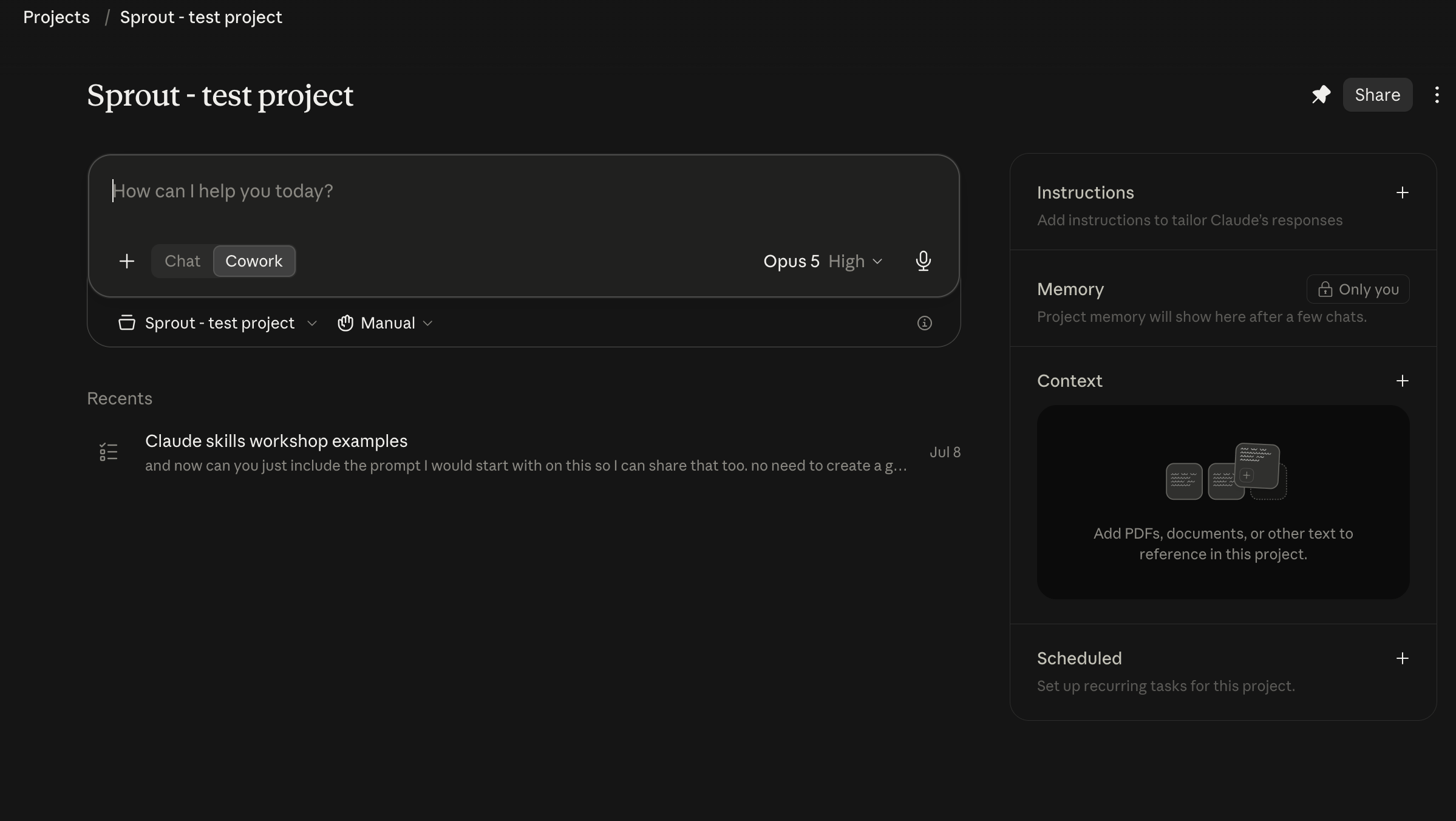
A folder covers one piece of work, while a project covers a whole stream of work that you keep coming back to.
Inside a project you get four things:
Instructions, which work like your context documents but scoped to this one stream of work. Something like “this project is for our quarterly research roundup for the leadership team, and the audience is the VP of Product and two directors who won’t read past the first page”
Context, which is one or more folders or links that Claude works from. Every conversation inside the project has access to them, so you’re not reconnecting a folder every single time or reexplaining yourself constantly. Please don’t start or use projects (or AI, really) without context!
Scheduled tasks, which are recurring runs that belong to this project. I will go more in-depth on scheduled tasks further down. You set these up from a conversation inside the project and they run with the project’s context every time
Memory, which is what Claude builds from the conversations you have inside the project, so it accumulates as you work and you can force it to update the memory by asking
Outside of a project, every session starts fresh apart from whatever context you connect, while inside a project each conversation adds to what Claude knows.
For us this maps really well, since research is a stream of work rather than a pile of unrelated tasks. The streams I’d set up as projects are:
A product area or squad you research repeatedly. Every study for that area lives in one place so Claude can pick up the history as you go and build on it
A recurring deliverable, like a quarterly roundup, the monthly repository update, the leadership readout. Each cycle is a new conversation in the same project that builds on the last one
Studies that require a lot of documentation. For each study, you put in briefs, decisions, findings, status updates, all in one thread so that you can build and run a study efficiently
A client, if you’re freelance or agency side, which includes information about the client and the projects you’re working on
If your stream of work isn’t one of those four, here are the three things I look for:
It recurs, so I’m going to be doing this again rather than once
It builds up context that would be annoying to re-explain every time, like decisions we’ve made, what we already tried, who the stakeholders are, what went wrong last round
The next round genuinely benefits from what happened in the last one
Create a project
There are three ways to create a project. You can start from scratch and add instructions and context as you go, you can point it at a folder you already work out of so that folder becomes the project’s working directory, or you can bring over a project you already have in Chat, which carries the instructions and knowledge across.
To make one, click Projects in the sidebar and then New project. You can change the folder, the instructions, and the connectors at any point after that.
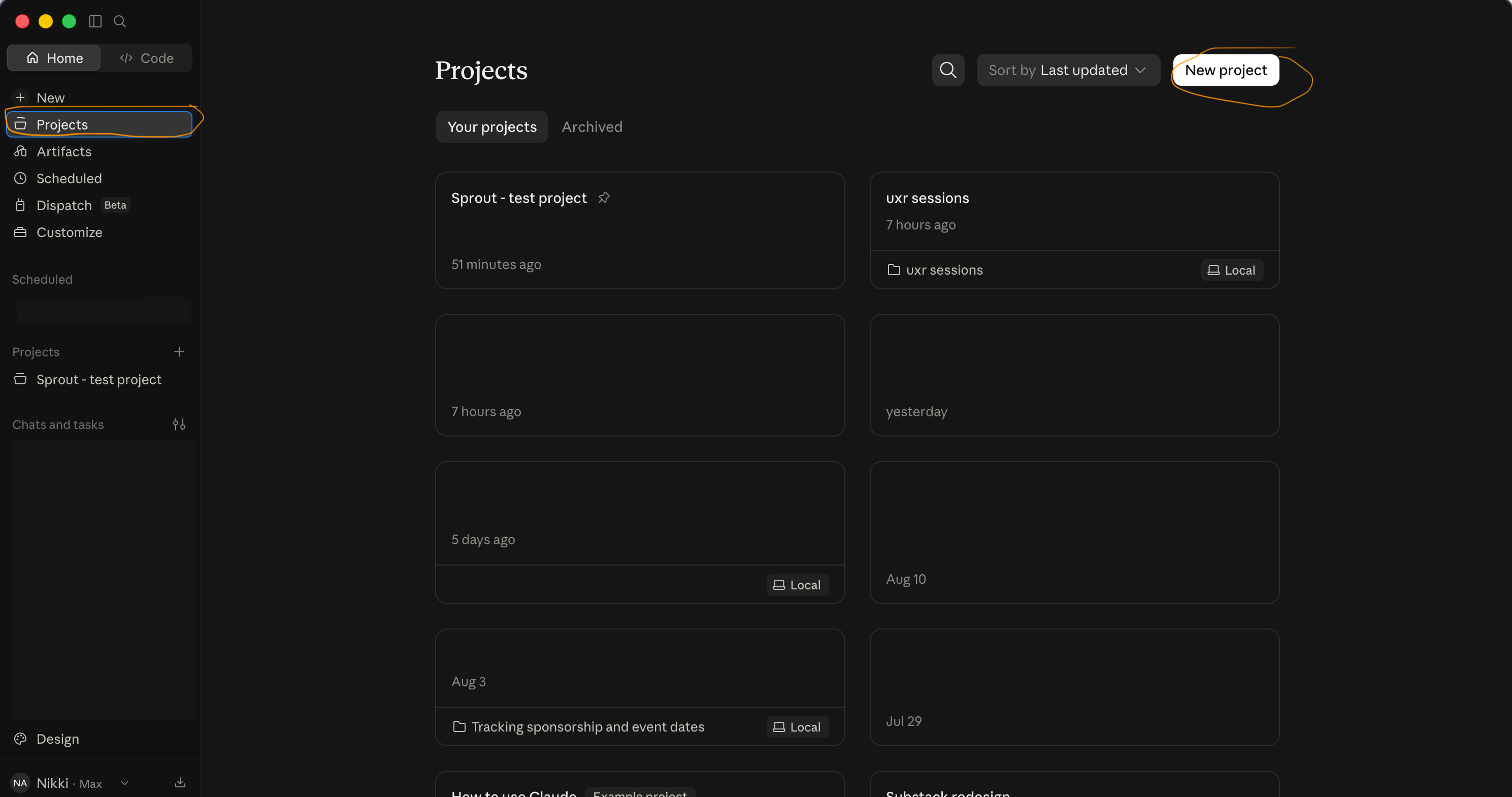
(I had to blur out some projects as they are confidential!)
Writing your project instructions
Instructions are the one part of a project you actually write yourself, so here is roughly what mine look like:
# Project instructions

## What this project is for
[The stream of work in a sentence or two. E.g. "This project is for all research
on the [X] product area, run with the [squad name] squad."]

## Who the output is for
[Who reads what comes out of this project and how they read it. E.g. "The PM and
design lead read everything. The VP sees the topline only and won't read past
the first page."]

## What I want by default
- [Format, e.g. "Markdown preview before any final document gets created"]
- [Structure, e.g. "Recommendation first, evidence after"]
- [Standards, e.g. "Participant IDs on every claim"]
- [Anything specific to this stream, e.g. "Always compare against the Q1
  baseline study in the context folder"]

## Where this stream is right now
[The current state. E.g. "We're mid-way through the onboarding redesign. The last
study found X. The open question is Y."]

## Things you don't need to ask me again
- [The recurring clarifications you're tired of giving]
And if you’d rather not write that from a blank page, this gets you a first draft:
I'm setting up a project in Cowork for [stream of work]. Interview me one
question at a time until you have enough to write the project instructions.

Ask me what this stream of work actually is, who reads what comes out of it and
how they read it, what I want by default in terms of format and structure and
standards, where this stream is right now, and what I keep having to explain
every single time we start something in this area.

Don't write anything until you've asked me everything. Then write the
instructions and tell me what you still don't know about this stream of work.
You might have to edit instructions as the project goes on and the work evolves, but its always good to start with something.
Working with the memory
Memory builds up on its own, and I’ve found it’s worth pushing it along now and then rather than leaving it entirely up to Claude.
When something changes that I want it to hold onto:
Remember this for the whole project going forward: [the thing]. Update the
project memory now and tell me what you've stored.
And every month or so I run an audit, since Claude can sometimes infer something it should memorize, which can then cause it to make mistakes:
Tell me everything you currently know about this project. For each thing, tell
me where it came from and whether it's something I actually told you or
something you've inferred. Flag anything you're not confident about.
The audit has helped me catch a few things Claude had generalized from one session into a standing fact about the whole product area.
Don’t make a project for everything
When I first got a hold of projects, I made one for pretty much every piece of work and ended up with about fifteen of them, half barely used, and some overlapping and then confusion and frustration ensued.
I’d rather have four projects I genuinely work in than fifteen I don’t. If a stream goes quiet for a couple of months I fold it into a broader one, and if two projects keep referring to the same work then they should probably just be one project. When you do consolidate, you can ask Claude to summarize everything it knows from the project you’re closing, then paste that into the one you’re keeping so nothing gets lost.
Connecting tools
Connectors are essentially how Claude goes into other tools that you use can read information for them or do things on your behalf. The most common example is connecting it to your email so it can read your emails and even draft (and send!) emails on your behalf. A bit scary but definitely useful!
Setting one up:
Open Customize in the left sidebar and go to Connectors
Click the + next to Connectors
Browse the list and click the one you want
Have a read of what it says it can do, then click Connect
Log into that tool when it asks you to
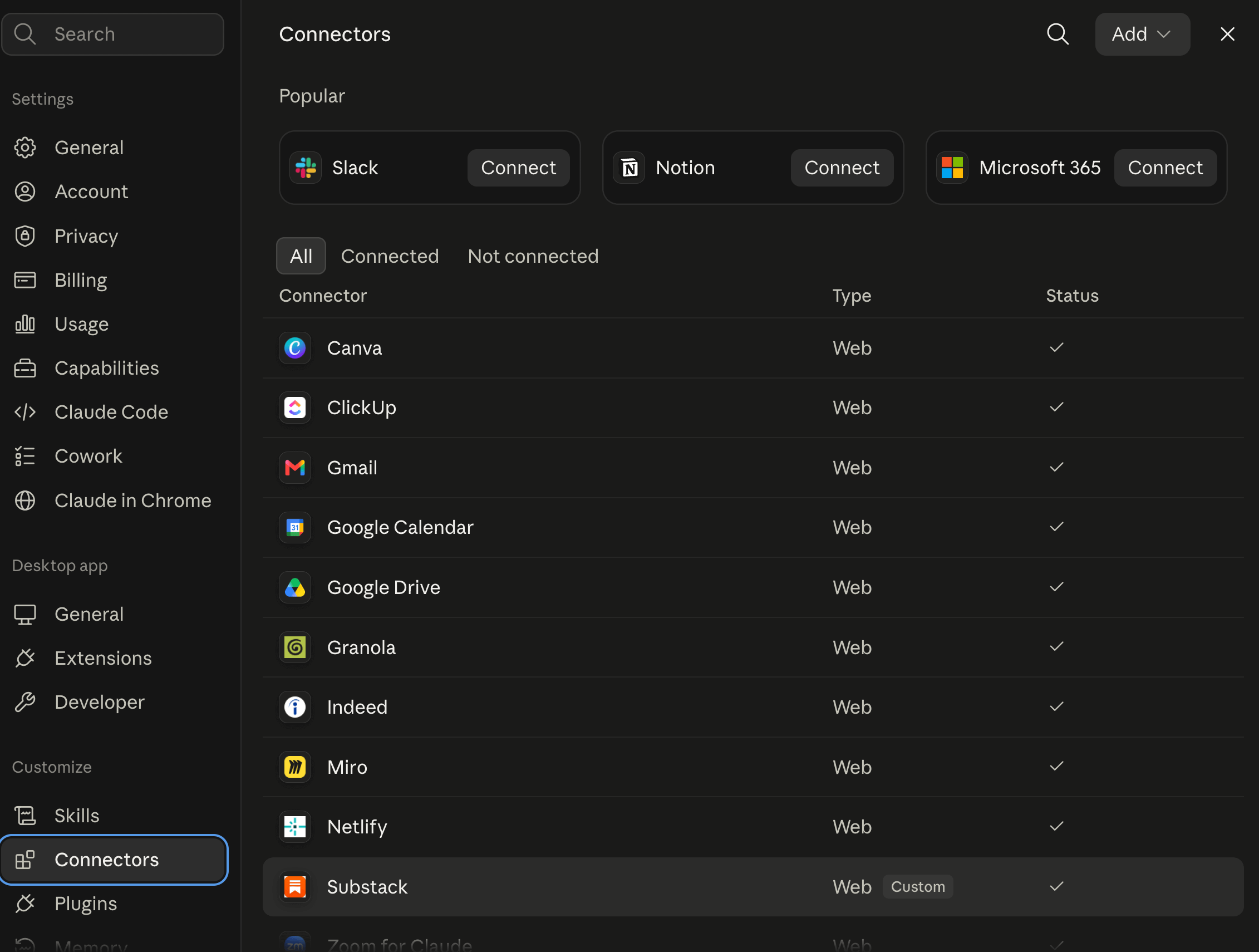
You only do that once per tool. After that it stays available in future sessions and you don’t have to authorize it again.
Turning one on for a specific task:
Click the + in the prompt bar, or type /
Hover over Connectors
Toggle on the ones you want for this task
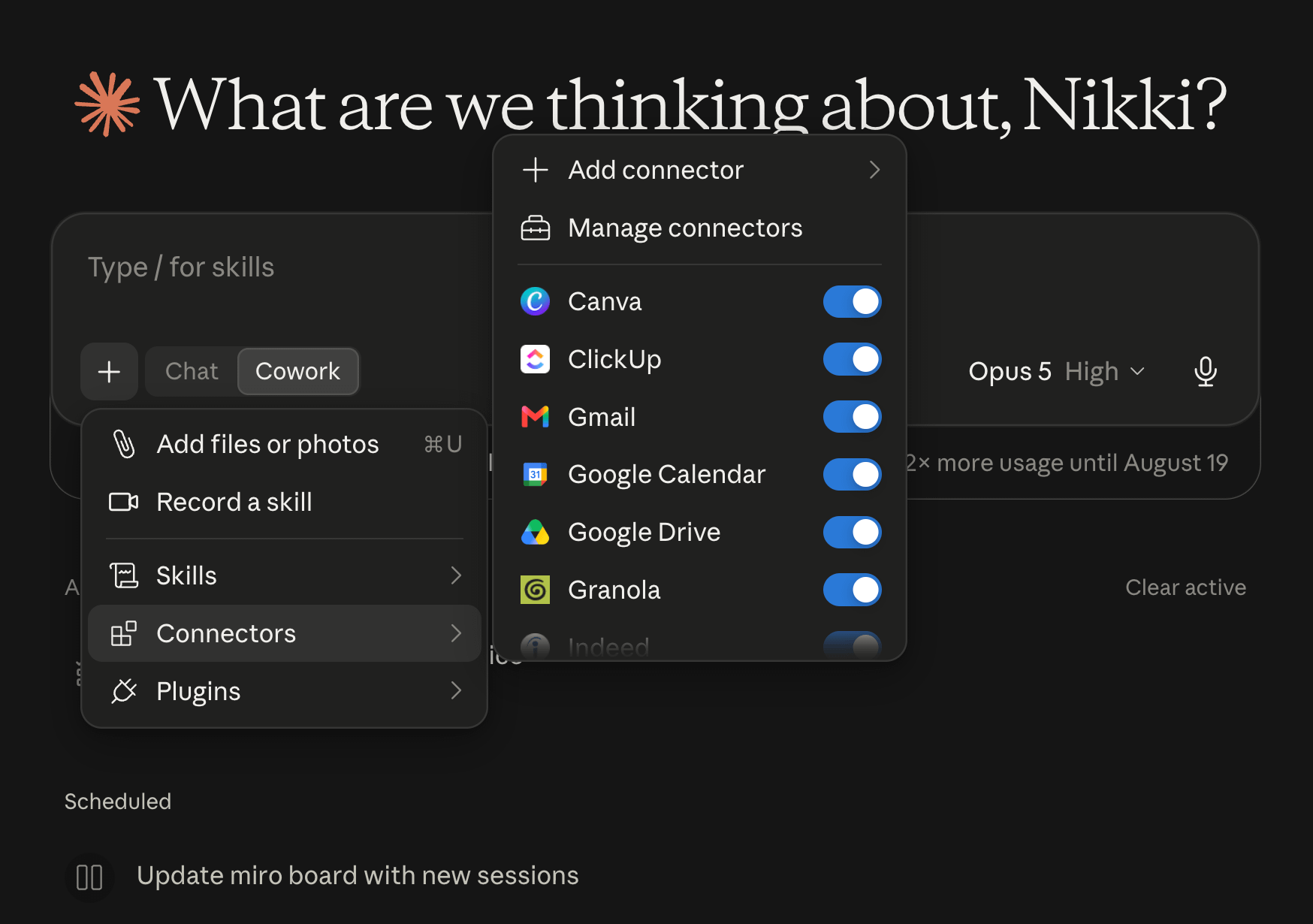
If you're on a Team or Enterprise plan, an owner has to enable a connector for your whole organization before you can authenticate it yourself, and they can also restrict it so it can read but not write. So if a connector you want isn't showing up at all, that's usually why.
For each connector, you then can determine what you want it to read, write and be able to do. You click into each connector and apply whatever settings feel most comfortable to you.
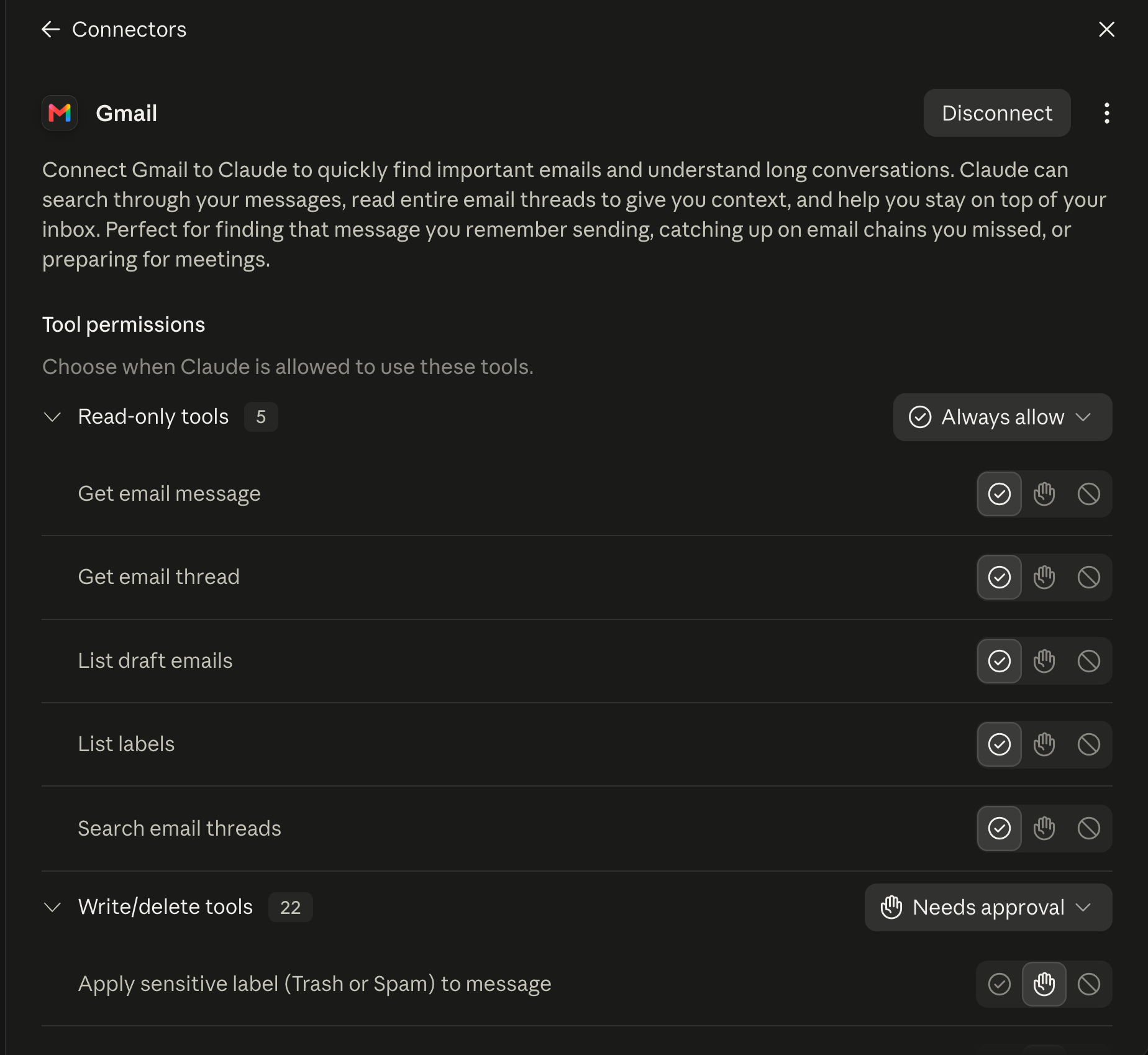
Custom connectors or Claude in Chrome
Some tools don’t live in Anthropic’s directory, so you might have to add a custom connector. Most tools that have custom connectors guide you through the process and all you have to do is put in their custom URL.
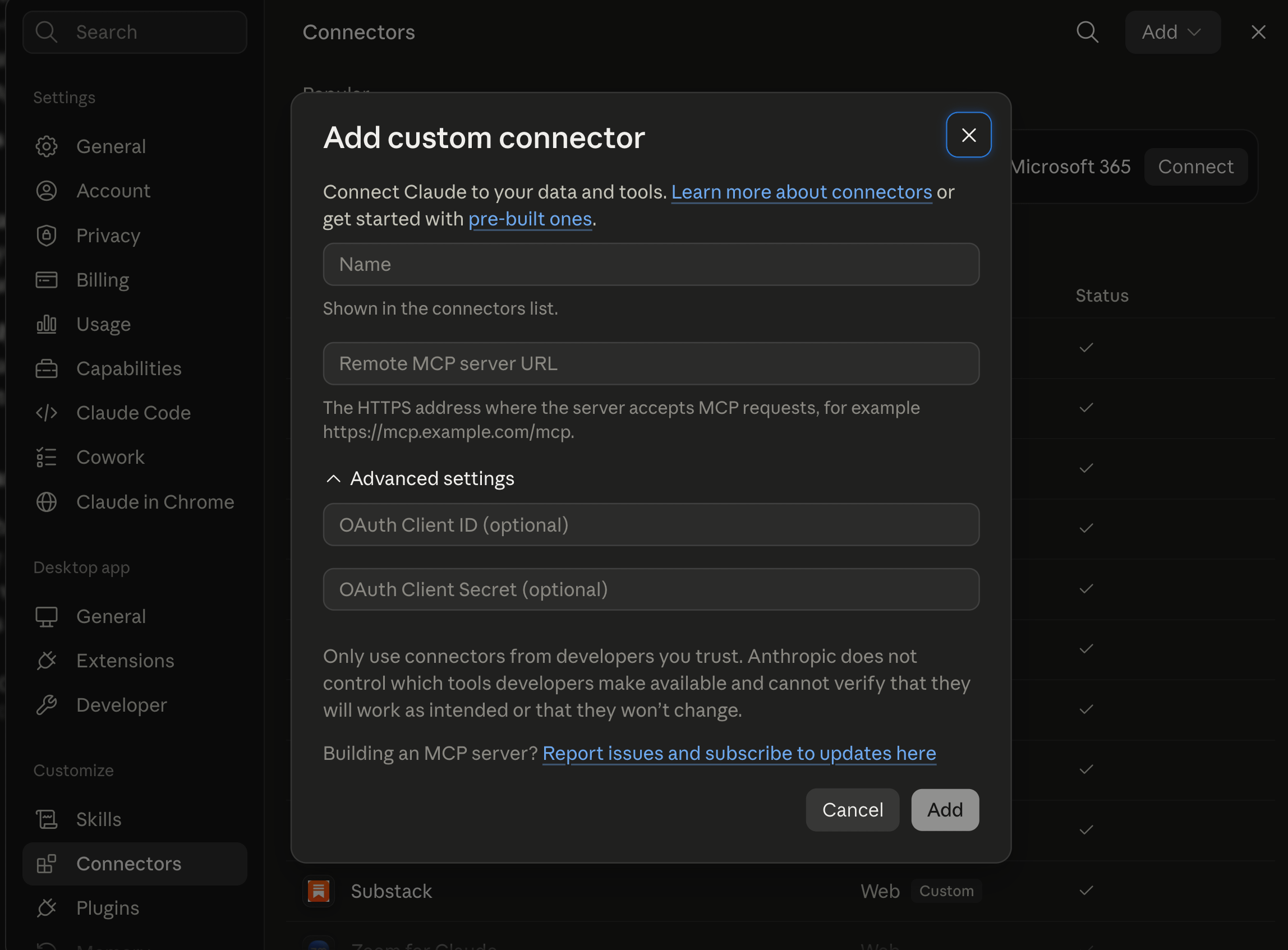
And other tools have no custom connectors, so you can download Claude in Chrome which allows Claude to access your browser.
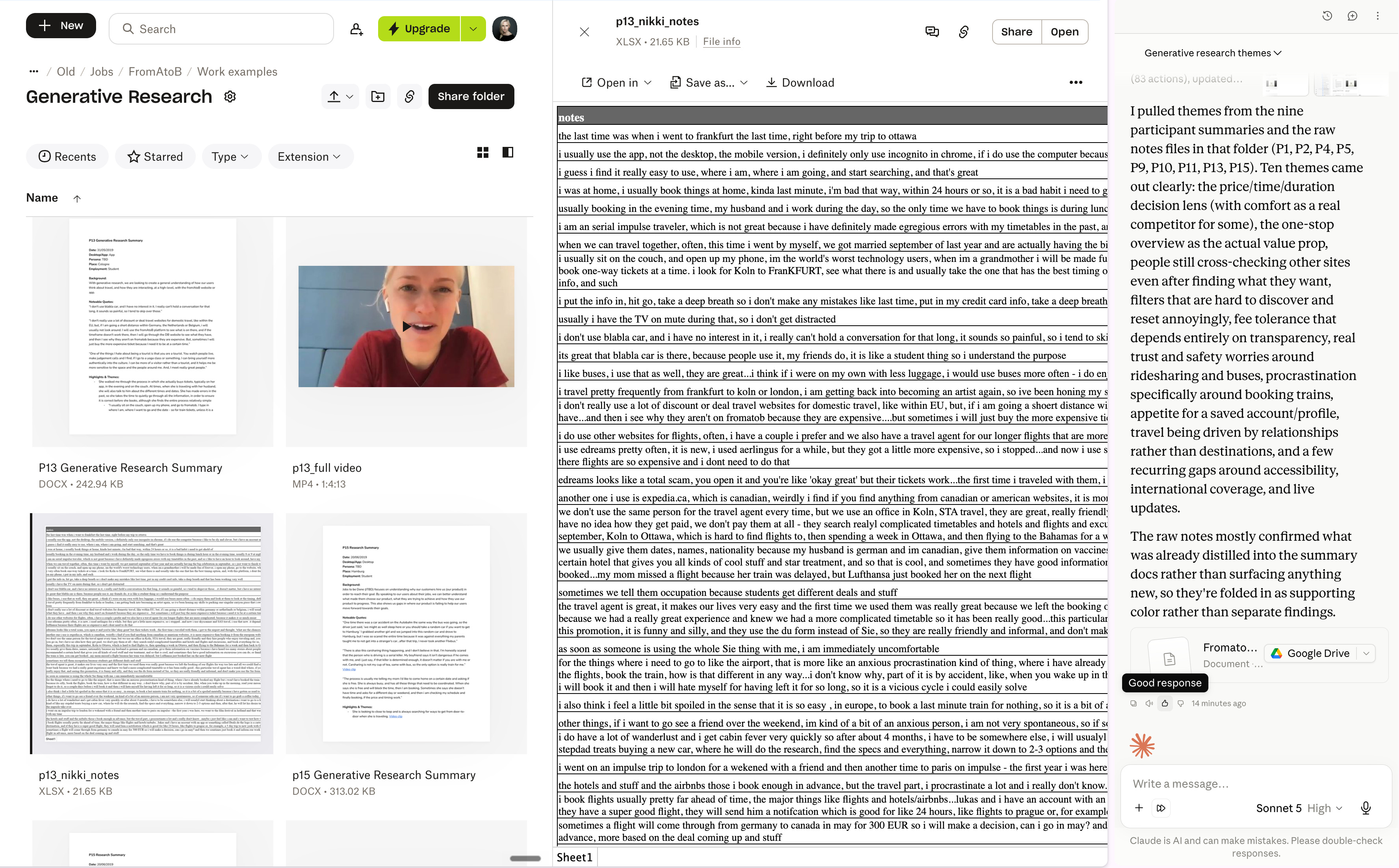
The top three to start with
Email and calendar (Gmail, or Outlook through Microsoft 365) because so much information and context lives there, enabling Claude to read through threads about projects, recruitment logistics, or learning your voice.
Search my email for everything relating to [study] recruitment between [date]
and [date]. Give me a table of who we contacted, who responded, who confirmed a
session, who dropped out, and the date of the last contact for each one.

Flag anyone we've contacted more than twice with no reply so I can stop chasing
them, and flag anyone who confirmed but doesn't have a session in my calendar.
Look at my calendar for the next two weeks and list every session for [study]
with the participant ID, the date and time, and the session length. Cross-check
that against [folder] and flag any session where I don't have a returned consent
form.Cloud storage (Google Drive, OneDrive or SharePoint through M365, Box). This is where you can have it search for relevant information relating to a particular project or team, which can be incredibly helpful when trying to search through a whole lotta past data and studies.
Search my Drive for any previous research relating to [topic or product area],
going back [timeframe]. For each thing you find, give me the date, who ran it,
the method, the headline finding, and your honest read on whether it is likely
to still be valid given [what has changed since].

I want to know what we already know before I scope this study, including
anything that would make this study unnecessary.
Messaging (Slack, or Teams through M365). Similar to email, so much context lives in messages and being able to go through what stakeholders said about a project is so incredibly helpful.
Search [channel] for everything the team has said about [project] since [date].
Give me three things: the positions different people have taken, the points
where they visibly disagree with each other, and the exact messages where a
decision was made or a commitment was given.

Then list every assumption someone has stated as though it were established
fact. I want to know what this team already believes before I design the study,
so I don't accidentally design something that only confirms it.
Research-related tools
Your repository. Most of the dedicated research repositories have connectors now, and if yours lives in a wiki or a database instead, you can connect that too. This can help you dig up a lot of previous knowledge on a topic, which is fantastic for making sure we are no longer starting projects from scratch, and we can truly identify the gaps we need to fill with impactful research studies.
Search our repository for everything we know about [topic or user group]. Give
me the insight, the study it came from, the date, and how many participants
supported it.

Then tell me where the evidence is thin, where two studies disagree with each
other, and what we've never actually looked at.
Your recruitment and study platform. If your team runs recruitment through a dedicated platform, connecting it can remove a lot of the admin around finding participants, building screeners, and pulling study data back out. This is the connector that saves the most tedious hours in my experience.
Your survey tool. Worth checking whether yours has a connector, since going from criteria to a fielded screener without leaving Cowork removes a whole context switch from recruitment, and also enables you to analyze a large amount of data relatively quickly.
Your transcript tool. Most of the meeting and transcript tools have connectors now. If your sessions are recorded through one, you can pull transcripts straight in rather than exporting them and dragging files around. This is also helpful for stakeholder meets and getting additional context surrounding a project to pull into a brief/plan.
Pull the transcripts of my last [number] meetings about [project]. Give me three
lists: every assumption someone stated as fact, every open question that nobody
answered, and every constraint that came up (budget, timeline, technical,
political). Keep the person and the meeting attached to each one so I know who
said what.
Your product analytics. This is the one I’d set up if you’re regularly asked the fun statistical significance question. Being able to pull the behavioral numbers that sit next to your qualitative finding changes that conversation completely. Most of the major analytics platforms have connectors, and what you’re after is the ability to query metrics rather than just read dashboards.
Pull the [metric] for [product area] over [time period], broken down by [segment].

I have a qualitative finding that [finding]. Tell me what this data does and
doesn't support about that, and be honest where the two don't line up rather
than trying to make them agree.
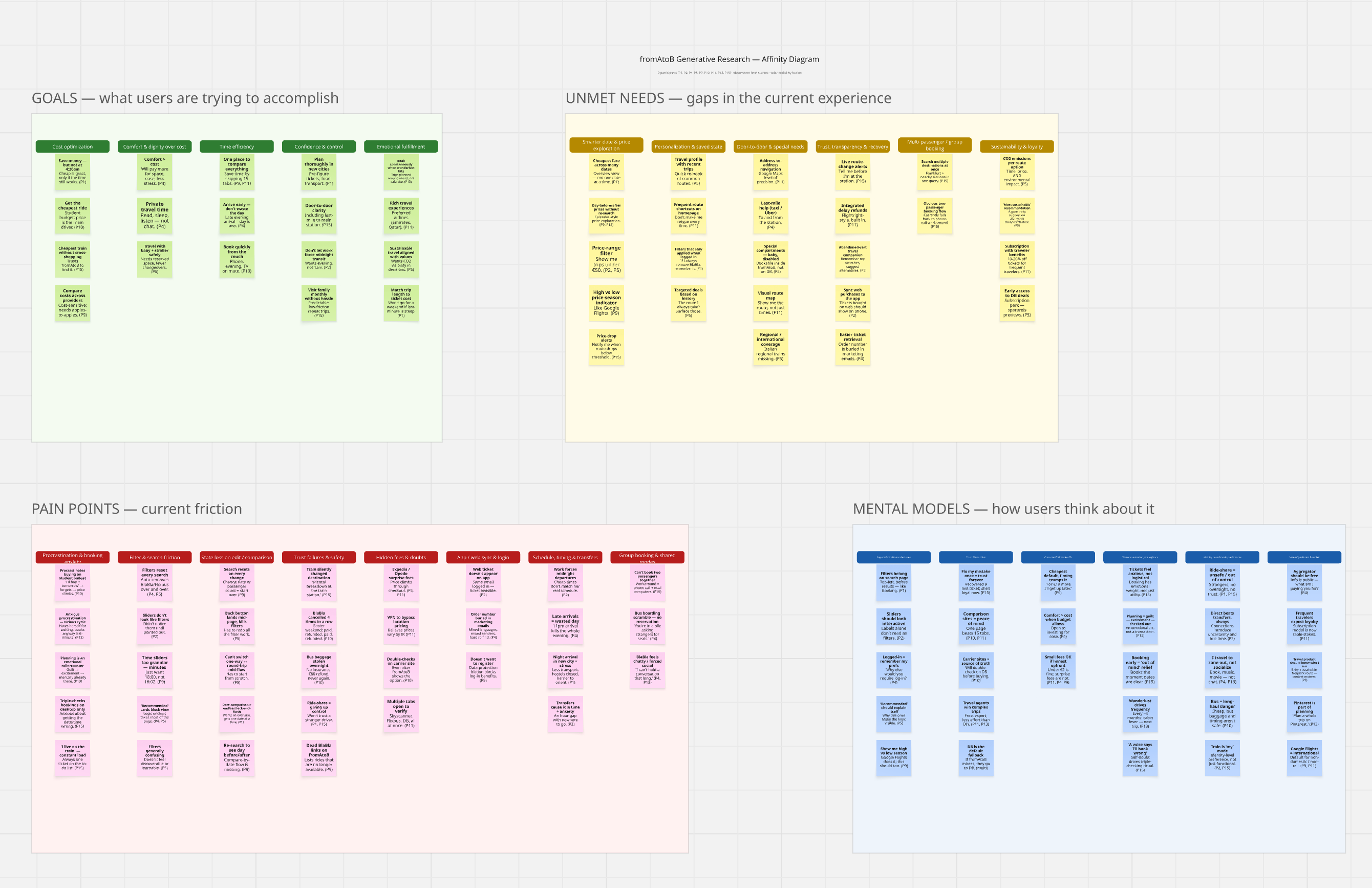
Miro. This one has been so fun for me and such a timesaver. The connector can create and read board content, so you can go from a folder of tagged transcripts to a first-pass affinity wall on a board without doing the sticky note admin yourself.
Using the clusters in [file], build me a first-pass affinity board in Miro. One
frame per cluster, one sticky per tag, with the participant ID on each sticky.
Put the thin clusters in their own frame at the side so I can see them
separately.

This is a starting point for me to move around, so don't try to make it final.
Here’s a first pass of what it did on its own (with instructions on how to affinity diagram):
Figma. Reaches your design context and can pull screenshots and FigJam boards. It can be useful for building a usability test guide against the actual screens rather than a description of them, and for checking what changed between the version you tested and the version that shipped.
Tools I’d use for different parts of the process
You don’t want everything on all the time, so this is roughly how I set it per task.
Scoping a new study: cloud storage and your repository, so you can find out what already exists, plus messaging to surface what the team already believes
Recruiting: email and calendar, plus your recruitment platform if you have one
Running sessions: calendar and your transcript tool, and nothing else
Synthesis: your working folder and your transcript tool, and I’d turn the rest off so nothing outside the study leaks into the themes
Reporting: your working folder, your repository for past reports, and analytics if you’re pairing the finding with a number
Activation and follow-up: messaging, email, and whatever your team tracks work in
I wrote an article on the top 10 tools for user researchers to connect, so check that out if you want more ideas on what to connect!
Building skills
Skills are when AI actually becomes efficient and effective because skills are essentially your brain put into text files for Claude to reference.
A skill is one particular task that you want Claude to run. The reason the scope matters so much is that if you bloat a skill and put too much into it, AI gets confused and does everything badly. When you make skills more specific, it’s easier for it to do that one task rather than trying to do everything at once. It’s a bit like multitasking, we don’t want AI trying to multitask in a skill.
So my skills are things like affinity synthesis, a pyramid report, a survey builder, a research plan builder, an insight writer. Not “run the whole synthesis process” or “set up a research project.”
What’s in a skill
Technically, a skill needs a name and a description.
The name is lowercase and hyphenated, with nothing else in it. So affinity-synthesis or pyramid-report or survey-builder. That formatting is what Claude needs to read the skill properly. Name it something that would be obvious to you when you see it in a list.
The description has three parts:
What it is. “Synthesize qualitative research data using affinity diagramming by turning raw interview notes and transcripts into patterns, themes, and insights.”
When to use this skill. “Use this skill when a researcher has completed interviews and needs to find patterns, understand how to code and tag qualitative data, is running an affinity diagram session alone or with a team, or is stuck turning raw data into insights.”
Triggers. The words and phrases someone might say that get this skill to run. For affinity synthesis mine are things like affinity diagram, affinity diagramming, finding patterns, coding data, tagging research data, analyzing interviews, synthesis.
I recorded a video on the anatomy of a skill to help illustrate them in more depth, and I also run an Introduction to Claude Skills for User Research workshop where we build them together.
You can also slash command it, so typing /affinity-synthesis pulls up that skill directly, and the triggers are what make it fire when you haven’t.
I’d spend real time on the triggers, especially if your stakeholders are going to be using these. You want to think about how they would actually talk to Claude, since they won’t use our words. When I’ve worked with teams we’ve done a lot of testing on trigger words and how stakeholders phrase things, and it’s usually the difference between a skill that gets used and one that sits there.
The necessity of context
You can absolutely create a skill with just a name and a description and it will run for you.
It will also make up a whole load of stuff and hallucinate for days. It will decide how it wants to create an affinity diagram. It will assume what patterns mean, what themes mean, what insights mean, what codes it should use. There are a lot of assumptions in there, since a description on its own doesn’t give Claude anywhere near enough context to know what good looks like and what bad looks like.
The number one most important thing with AI is context. We don’t want it generating new frameworks or new ways of working for us. The whole point of a skill is to distill your brain and your way of working into something reusable, so it’s your process running faster.
Without that, it goes off into fantasy land and does whatever it wants, which is not super fun to deal with.
So what’s the rest of it? Mine run to nine, ten, eleven pages, and it’s all context. It doesn’t have to be that long (I tend to give more context than I probably need to), but I err on the side of caution.
The pattern I use for creating context in skills is definition, approach, example.
Definition is what the thing actually is. Claude will happily invent its own definition of a pattern, a finding, an insight, or a tag, and it won’t be yours. So for tagging I write out that tags, also called codes, are words that represent categories of information found in your data. For patterns I write that a pattern is a cluster.
Approach is how you do it. This is where your brain goes. For tagging, I explain that there are two approaches, deductive and inductive, what each one means, and that I usually use deductive with global tags and add inductive tags as patterns emerge that don’t fit. Then I list my global tags, which are goals, motivations, needs, tasks, pain points, tools, and positive emotions, and say I focus on four to five per affinity diagram.
Example is what it looks like in practice, and this is the bit people skip. So for tagging I give actual statements and how I’d tag them. “I don’t have time to stretch at the gym and I don’t have equipment at home” is a pain point, since it’s something that gets in the way. “I’m trying to become more flexible and stretching is a key part of that” is a goal, since the person stated what they want to accomplish.
Each step of your process gets that treatment, and a bigger step might have several definitions, several approaches, and several examples inside it.
Examples can also be before and after, so a bad version and a good version. I find that especially useful for anything to do with writing, like insights or report headlines, where showing the weak version next to the strong one lands better than describing the difference.
Additional context
Once you have definition, approach and example running through your process, there are a few more things I put in depending on the skill.
Mistakes, or what not to do. We think a lot about telling AI what to do, and sometimes we should tell it what not to do. Mistakes give it extra boundaries. In my pyramid report skill I have common mistakes like burying the insight in the background, being vague or hedging, and focusing on the process instead of the insight, each with the weak version and what to write instead.
The information Claude has to ask you for before it starts. In the pyramid report skill I list what has to exist before a report can be built, so Claude comes back and asks me for it rather than inventing it. This matters enormously for democratization, since it forces whoever is using the skill to supply the context instead of letting Claude fill the gaps.
When this method is right and when it isn’t. My survey builder has a section on this, so if somebody comes along trying to set up a survey to understand why people do something, the skill stops them and says another method would be stronger. Surveys are usually over-prescribed, and building that guardrail into the skill is one of the better things I’ve done for the teams I work with.
Output options. What actually comes out when someone triggers this. My affinity skill can produce guidance on tagging, cluster identification, a pattern assessment, a synthesis session plan, or a walkthrough from cluster to finding. If you don’t define this, people trigger the skill and get something arbitrary.
Research reminders. A short list at the end of the rules that matter most. One data point per post-it, always include the participant number, an affinity diagram produces patterns and not insights.
What one looks like
Putting all of that together, here is a screener builder, which is a good first skill for most researchers since it’s genuinely a mundane task we do constantly:
---
name: screener-builder
description: Builds a first-draft screener survey from participant criteria. Use this skill when I'm recruiting for a study and have defined who I need to speak to. Triggers: screener, screening questions, recruit participants, participant criteria, who should I recruit, screen out.
---

# Screener builder

## What a screener is
A short survey used before a study to confirm someone matches the criteria for
that study and to screen out people who don't. It is not a research instrument.
Its only job is to get the right people into the sessions.

## Ask me for these before you start
- The study and the decision it's informing
- Who I need (the must-haves)
- Who I need to screen OUT, and why
- How many participants, and any quotas
- Which platform this is going into

Don't write anything until you have these. If I haven't given them, ask.

## Approach
1. Open with [number] low-stakes qualifying questions before anything sensitive
2. Turn every must-have criterion into a question that can be answered without
   the participant working out what I want to hear
3. Never ask a criterion question directly. Ask about behavior and infer
4. Include at least one screen-out for professional participants
5. Mark quota questions clearly as quota questions
6. Close with availability, incentive acknowledgement, and consent to be contacted

## Examples
Criterion: has abandoned a checkout in the last 30 days
Weak question: "Have you abandoned a checkout recently?"
Strong question: "Thinking about the last month, which of these have you done?
[list including 'started an online purchase and didn't finish it']"
Why: the weak version tells them the answer I want. The strong version asks
about behavior inside a list, so it doesn't signal anything.

## Common mistakes
- Leading questions that telegraph the right answer
- Asking about future intent instead of past behavior
- No recency window on a behavioral criterion
- Questions that don't screen anyone in or out, which should be cut

## Output options
- A full screener ready to paste into [platform]
- A criteria-to-question map, so I can see which question covers what
- A review of a screener I've already written

## Research reminders
- Behavior over self-report: "when did you last" beats "do you often"
- Every question earns its place
- Maximum [number] questions
- Tell me which two or three questions are doing the most screening
You can see the anatomy in it. Name, description in three parts, definition, the information it has to collect first, approach, examples, mistakes, output options, reminders.
Setting one up
Before anything else, go into Settings and check that code execution is turned on, since skills won’t work without it. If you’re on a Team or Enterprise plan, an owner needs to turn on both code execution and skills at the organization level first. Once that is done:
Pick a single task, not a whole lot of steps, something you have maybe templatized in the past like a research plan or a consent form builder or the screener example above
Get your materials together. You need to show Claude human-generated examples, so I recommend pulling:
Two or three examples of your own past output for this task that showcase your best work
Two examples of output that are bad and an explanation on why they are bad
Any templates you have on the task
Any documentation you have on the task process (ex: maybe you created documentation for stakeholders on a task, this can be really handy to put in as well!)
Have Claude interview you. Open Cowork and use this:
I want to build a skill for [the one task you're tired of re-explaining].

Before you write anything, interview me one question at a time. Ask me what this
skill should produce, when it should trigger, what words someone might say that
should make it fire, the definitions I use, my step-by-step approach, what a
great version looks like compared to a mediocre one, the mistakes I'd want you to
avoid, and what I check before I'd call it finished.

Push me when my answers are vague, especially about what "good" means and
especially about the definitions, since I'll assume you already know what I mean
by things like pattern, finding, and insight.

When you have enough, write the SKILL.md with the name lowercase and hyphenated,
and a description covering what it is, when to use it, and the trigger words.
Claude will (usually) produce a SKILL.md file for you. What I’d check before saving is that the name is lowercase and hyphenated, that the description covers all three parts, and that your context feels clear. If it doesn’t produce an md file, simply ask it to.
Depending on Claude’s mode, it might give you the option to save right there or you might have to download it and upload it into skills, both situations are shown below:

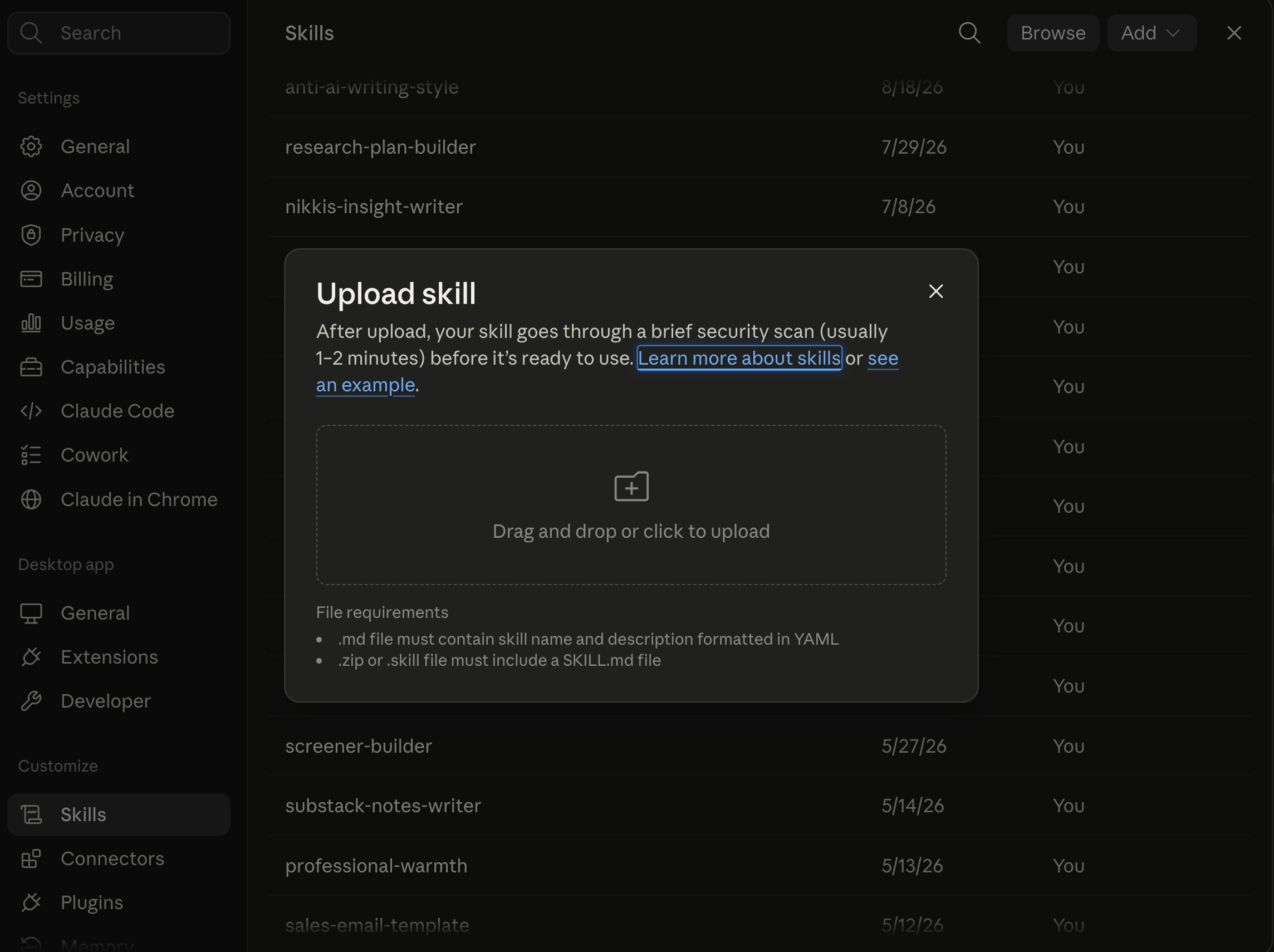
Once it’s in there you can view it as code, try it, edit it, replace it with an updated version, download it, share it, toggle it on and off, or remove it completely.
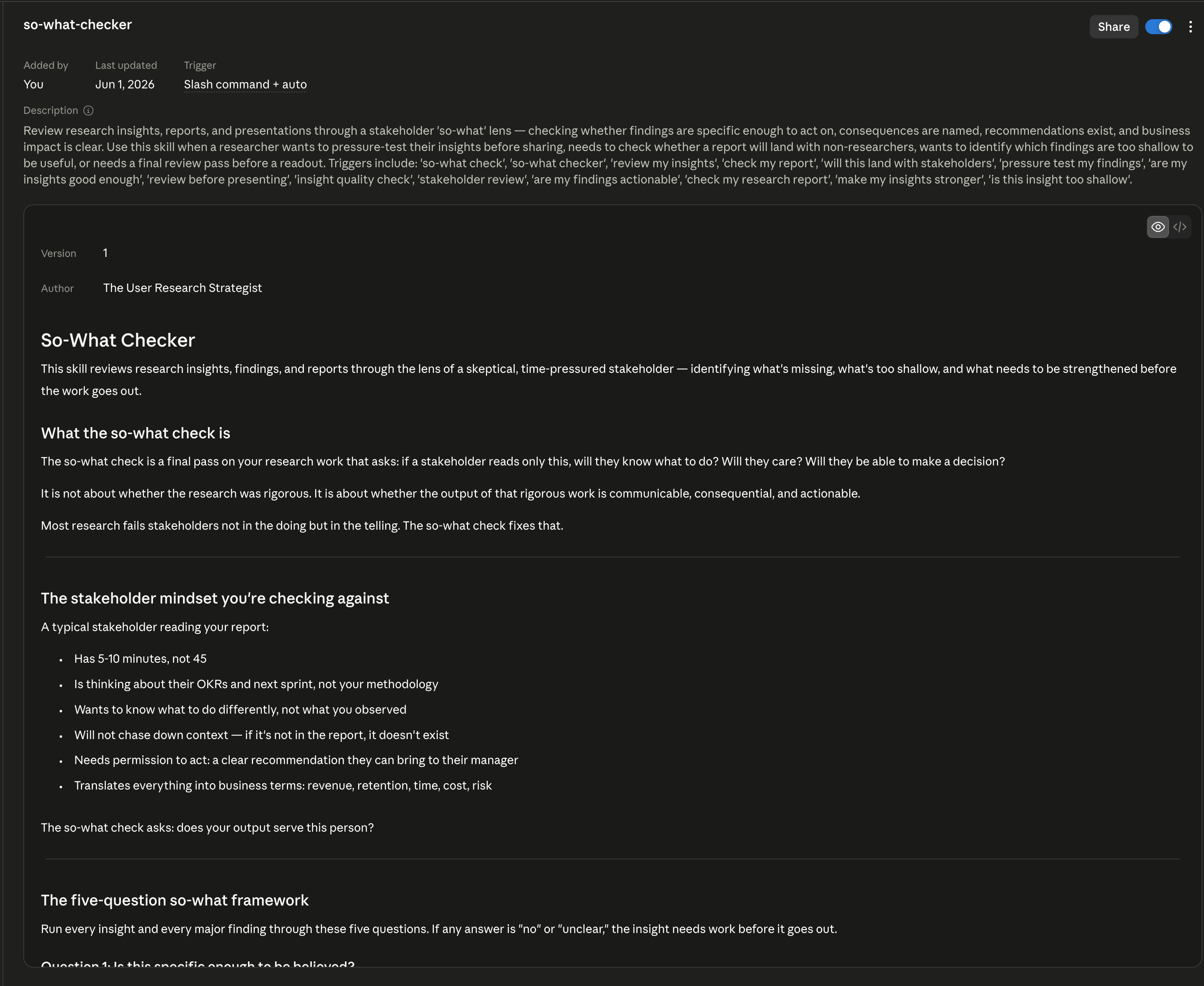
Testing it
Does it fire on its own? Open a brand new conversation and give it a real task without naming the skill. If Claude doesn’t reach for it, your triggers need to be reworked.
Does it follow your process, or just produce something plausible? Run it on a task where you already know what good looks like, then ask:
Walk me through which parts of the skill you applied and where. Tell me anything
in it you ignored or couldn't follow, and why.
I’ve had a couple of my own rules come back as too vague to follow, which I’d never have spotted from the output alone.
Does it break sensibly? Give it something incomplete or contradictory on purpose and see whether it asks you about it or ploughs on. If it ploughs on, add a line telling it what to do when the input doesn’t make sense.
Reviewing and fixing
You don’t rewrite the file, you tell Claude what to change:
That draft [did the thing you didn't want]. Update the [skill name] skill so it
[does the right thing] every time from now on, and show me what you changed.
Sharing and versioning
If you’re on Team or Enterprise you can share a skill with specific colleagues, a group, or the whole organization, as long as an owner has turned sharing on. People you share with see it greyed out until they switch it on, and they get a view-only copy that updates whenever you change yours.
If you’re sharing across a team I’d version them. It isn’t required, and it helps a lot with scaling, since otherwise you end up with six people running slightly different copies of your screener standards, which is the exact problem the skill was meant to solve.
What your first skill should be
I use a really simple test: if I’ve typed the same paragraph of context into three different prompts, that paragraph should be a skill. The other tell is when you find yourself correcting Claude in the same way over and over, since that correction is a rule you’ve never written down.
For researchers, the ones I’d build first are the mechanical tasks from earlier in this article. A screener builder like the one above, a discussion guide builder that follows your structure, a so-what checker that pressure tests your insights the way you would, and a post-session summary writer.
If you are feeling overwhelmed by skills, you can check out my bundle of 52 to get you started.
Building plugins (otherwise known as agents)
If a skill is one task, a plugin is the whole process. Plugins (interchangeable with agents) are the multi-step things, so this is where all the multitasking I told you to keep out of your skills is supposed to live.
Skills are the individual tasks you do while a plugin can hold multiple skills, tools, and can send out subagents to work on multiple tasks in parallel.
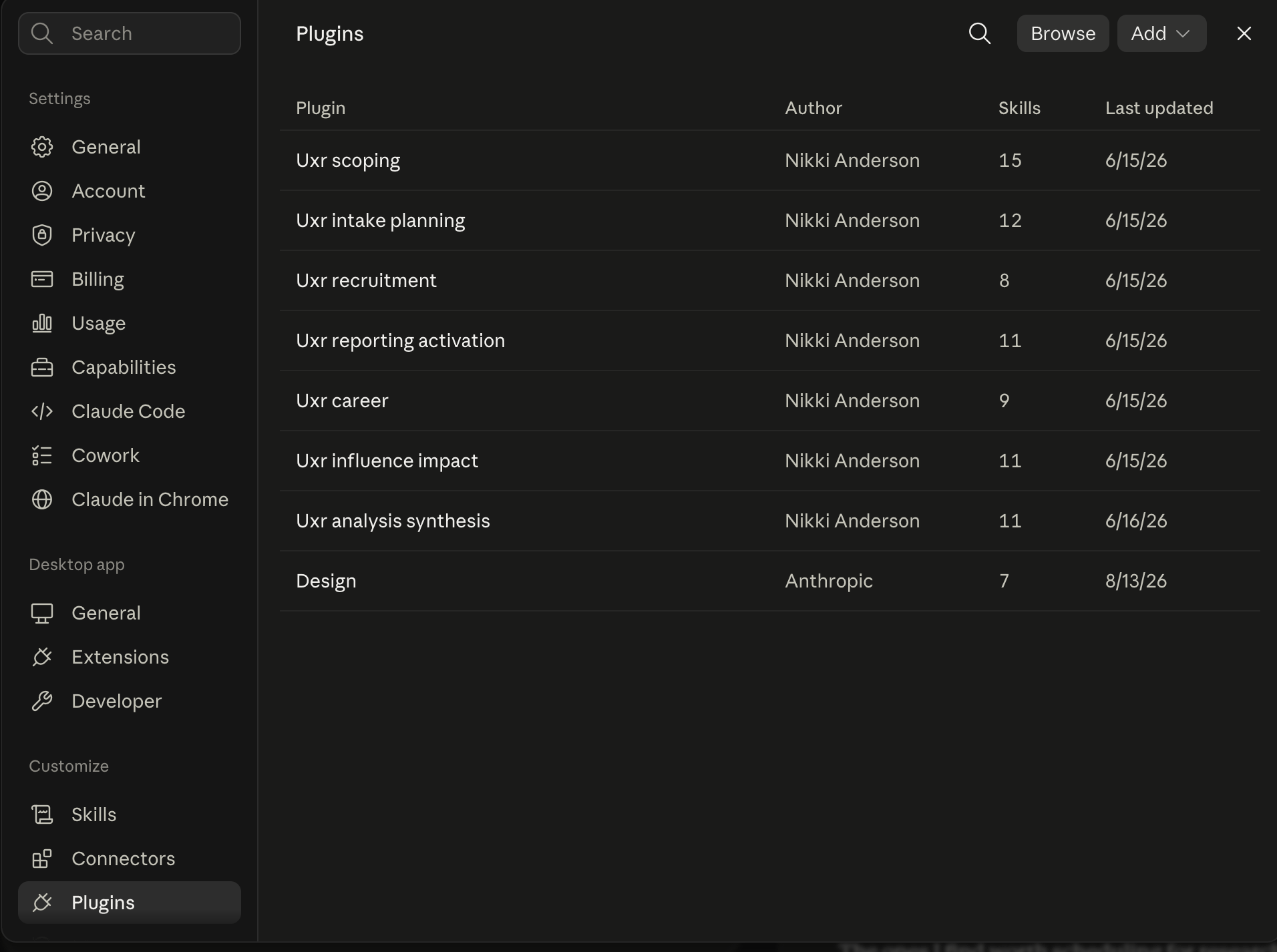
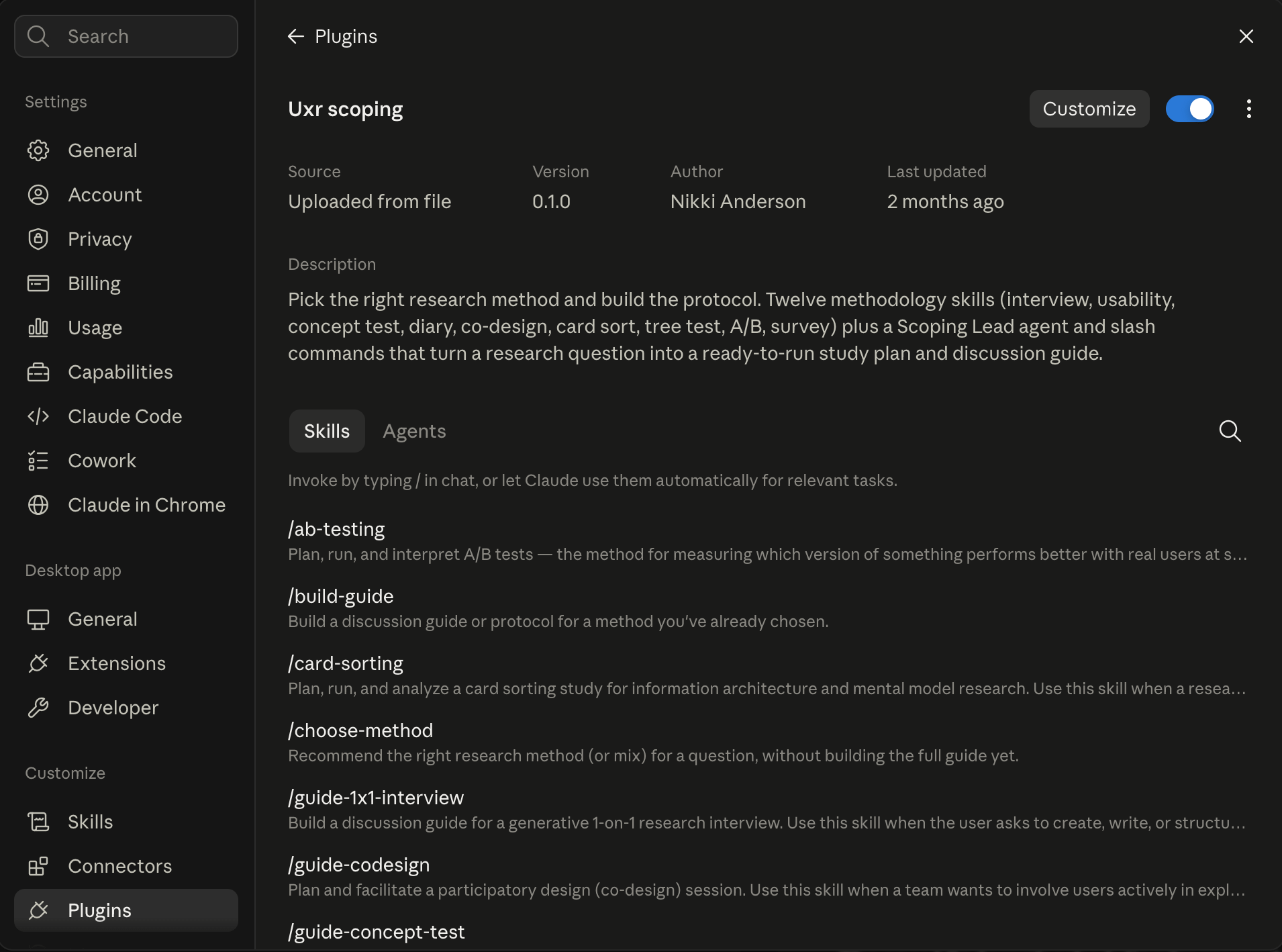
A plugin typically has three things in it:
Skills. The individual tasks, exactly as we built them above. This is the bulk of any plugin and for a lot of people it’s the only part they’ll use
Connectors. A plugin can specify which tools the process needs. For example, if your synthesis process assumes a transcript tool and a repository, the plugin would include that so Claude would automatically know to do work in those tools
Subagents. A subagent is a separate Claude that gets sent off to do one chunk of work on its own and report back, rather than everything happening in one conversation. Here are some examples:
One agent per transcript. Instead of one agent that reads eight transcripts and skims most of them, you send eight agents off to read each one properly and come back with their tags. In my experience the tagging is noticeably better, since nothing is competing for attention
A verification pass. An agent whose only job is to take a finished report and check every claim in it back against the source transcripts. This helps a lot with QA-ing your research outputs
A devil’s advocate. An agent that argues against your own insights and tells you where the evidence doesn’t hold or where stakeholders would lose interest in your work
There’s a fourth thing called hooks, which fire automatically on certain events, but I’ve never needed them for my plugins so I won’t cover them here.
When to build a plugin
Please, please, please (if you are new) build skills first and use them for a while before jumping into plugins. I created over 60 user research skills before I bundled them into plugins that made sense, and I also used connectors and projects and folders, and the whole nine yards before trying to dabble in agents. Doing this gave me a lot more confidence to roll them all up properly.
What you don’t want to do is create a plugin that has incorrect or poorly created skills because then, instead of just doing one task poorly, you’ll end up with a whole garbage process and a lot of frustration.
I’ve found it usually starts to make sense to create plugins when:
You have several skills that get used together on the same kind of work that could tie into an entire process, for example you are doing several separate tasks like running an intake + creating a research plan + creating a business case + prioritizing a project, which could all be done in one
You’re setting up other researchers or people who do research on your team and want them running your process rather than assembling their own from scratch
You’re doing democratization work and want stakeholders to have a whole workflow with the guardrails baked in rather than running individual tasks (as usually they will skip some!)
When your workflow starts to feel like this, it’s time to foray into the wonderful world of plugins (and they are wonderful).
Design it before you build it
Before I built any of my plugins, I designed what goes into them and why. When I first tried to create a plugin, it ended up as a mess because I included too much into it, and suddenly I had a synthesis + reporting plugin with about 37 skills, seven connectors, and way too many subagents. Just like skills, plugins can get too big too.
The way I think about it is having a plugin essentially for each part of the research process:
Scoping
Planning
Recruitment
Conducting
Analysis + synthesis
Reporting
Activating
Impact tracking
I sketch mine out by component first. Here’s what a synthesis plugin looks like:
Skills: transcript-tagger, affinity-synthesis, insight-writer, so-what-checker, topline-writer
Connectors: transcript tool, repository, cloud storage
Subagents: one per transcript for tagging, one verification pass over the finished report
If you want, you can have Claude do this part with you:
I want to build a plugin for my [process, e.g. synthesis] process as a user
researcher.

Before we build anything, help me design it. Walk me through my process one
stage at a time and for each stage ask whether it's a skill I need, something I
already have, or something that doesn't belong in this plugin.

Then tell me which tools this process assumes I have connected, and whether any
stage is big or repetitive enough that it would be better run as a separate
subagent rather than inside the main conversation.

Give me the result as a table of skills, connectors, and subagents, and be
honest with me about anything you think is bloat.
If Claude gives you a list of skills you haven’t yet created, please don’t go to the next step yet. If you do that, it will create skills without any of your context. First create all the skills that need to go into the plugin and then proceed with putting it all together.
Building a plugin
Same as skills, I’d have Claude do it with you:
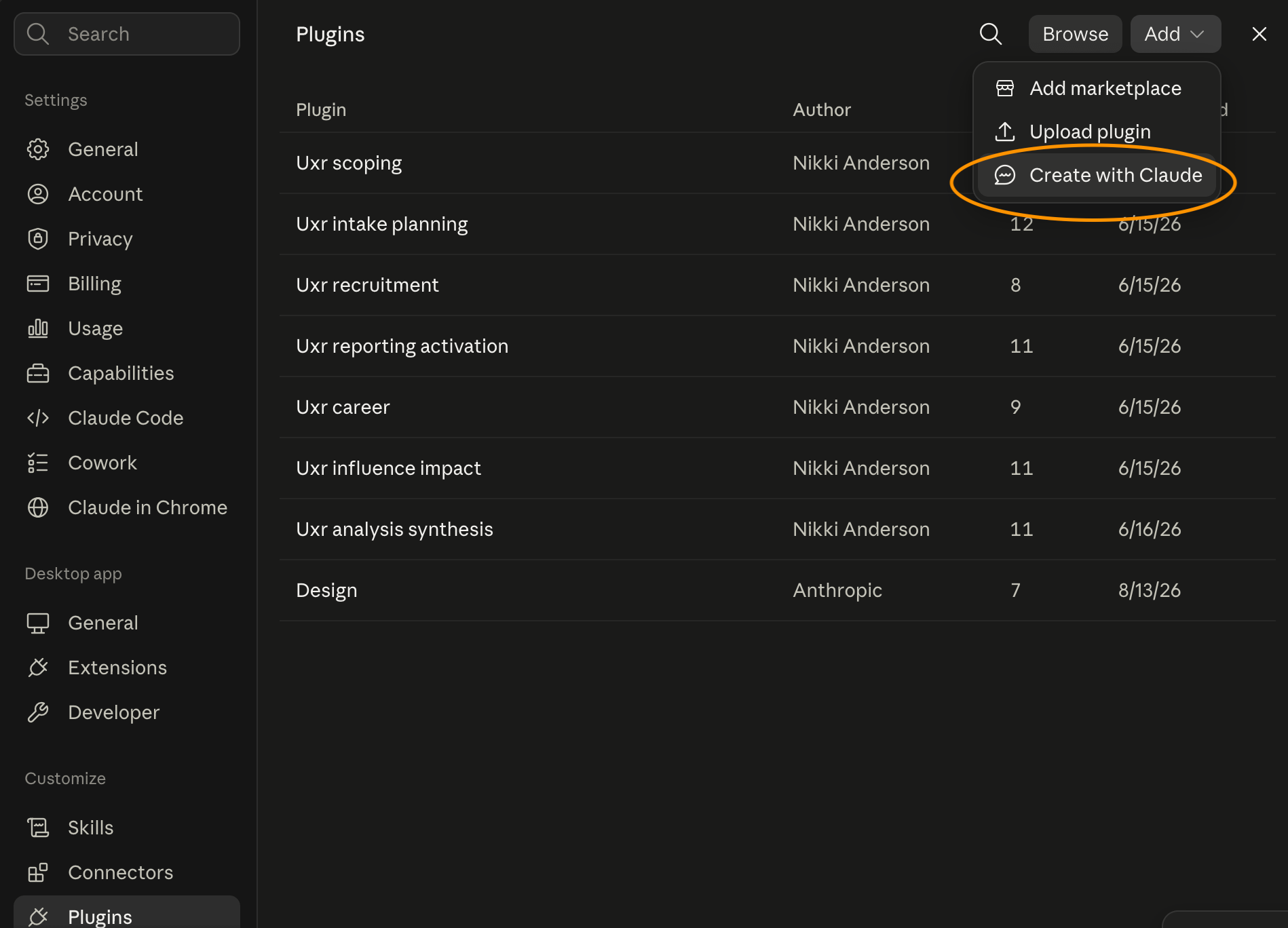
I want to build a plugin for my [process] process. Here's the design we agreed:
[paste your table].

Walk me through what you need for each piece, then build it and give me the
plugin file to install. If there are skills in here that haven't been built yet, please tell me before creating the plugin.
Claude will ask you questions about each component, put the whole thing together, and hand you a plugin file at the end that you install.
Then before I share anything, one more pass:
Read every skill in this plugin as though you were a researcher on my team who
has never seen any of it before. For each one, tell me what you'd get wrong or
have to guess at, and where the instructions assume knowledge I haven't actually
written down.
We can be so close to our own processes that we skip the parts that feel obvious, and those are exactly the parts a new person needs. This prompt is basically a usability test on your own documentation and will help you highlight anything that might be weak.
If you are feeling overwhelmed by plugins, you can check out my user research agents that will help you streamline your entire process.
Scheduling tasks
Scheduling tasks is one of the more fun parts of using Cowork and has been a real timesaver for me. There is a whole lotta potential when you schedule tasks for your plugins to do or schedule tasks for your projects, as it can take some of the admin work off you and free you up for more strategic (and enjoyable) work.
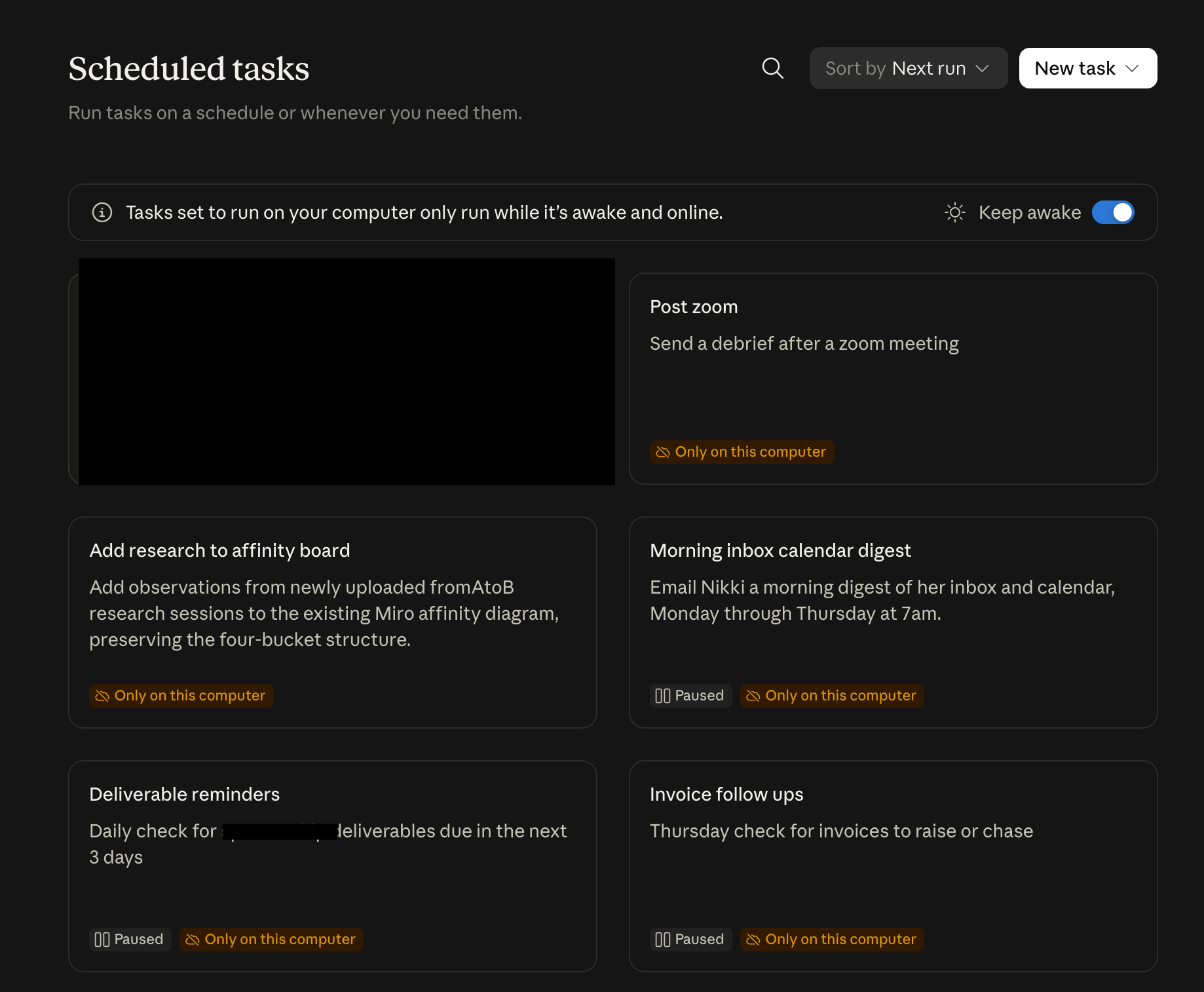
Of course, before you go wild and schedule all your tasks (I did this and it sucked, so trust me on this next piece of advice), go through your tasks and list out the mechanical versus judgement tasks, and then take a look at tasks that eat up the most of your time in the mechanical side of things. These often look like chasing tasks, such as sending out reminders or information, or catching up tasks.
Some of the most common scheduled tasks that I give to AI are:
Daily digest, which looks at my calendar and tells me what is coming up for the day and what I need to prep
Slack summaries, which pings Slack channels with the most recent research sessions and any emerging patterns
Transcript to first pass affinity diagram, which takes a session transcript and puts a first draft of the sessions into an affinity diagram
Slack message catch-up, which goes through Slack messages and gives a summary of any important information or action items
Reminder to ping stakeholders about impact, which reminds me to send out a message to follow up on any leading/lagging indicators from a project
So, how do you actually schedule a task? There are two main ways. One with Claude and one manually.
Let’s go through the manual process. First open up your scheduled tasks and click on “new task,” and “create manually.”
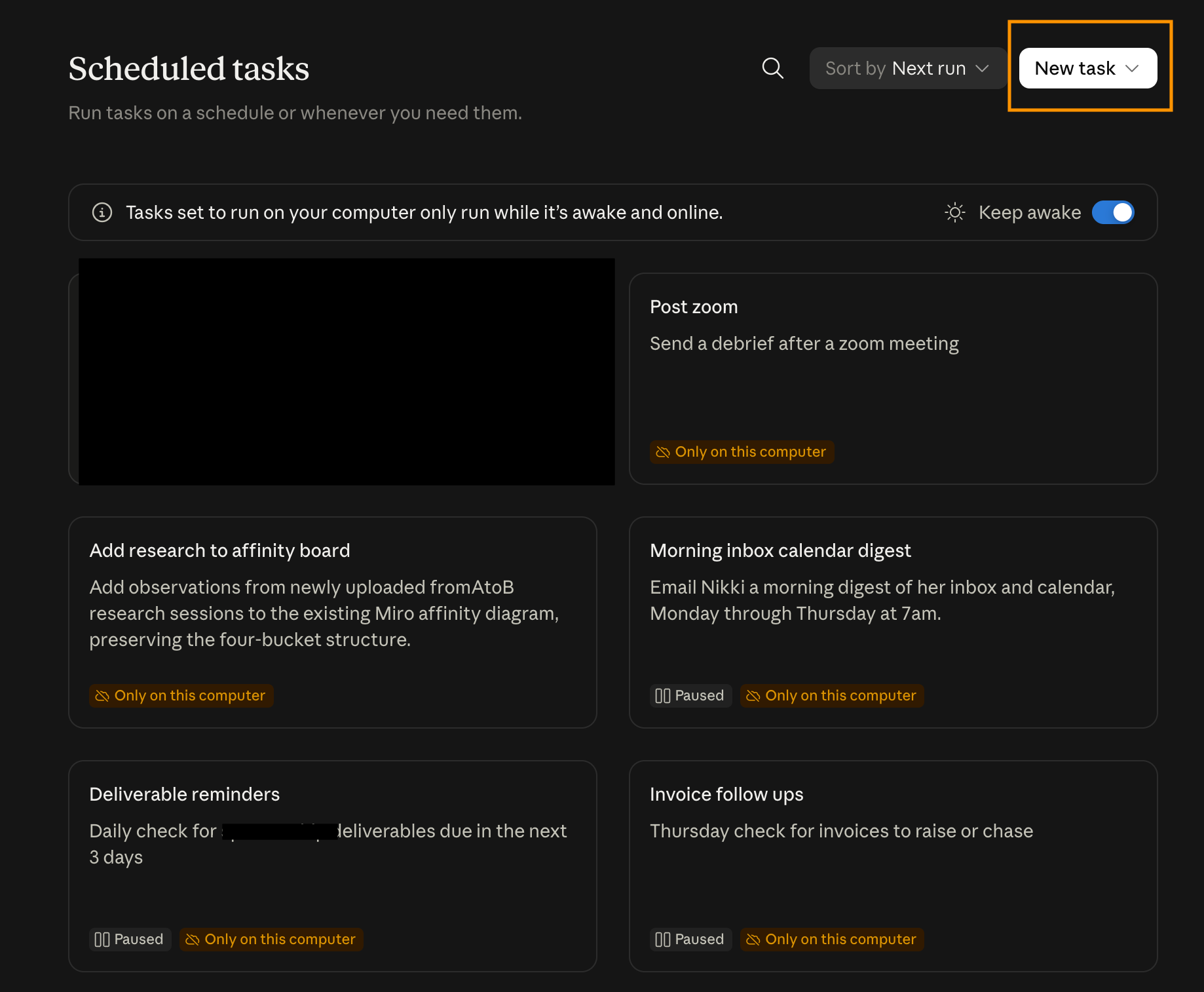
You’ll then be greeted with this screen where you need to fill in some information.
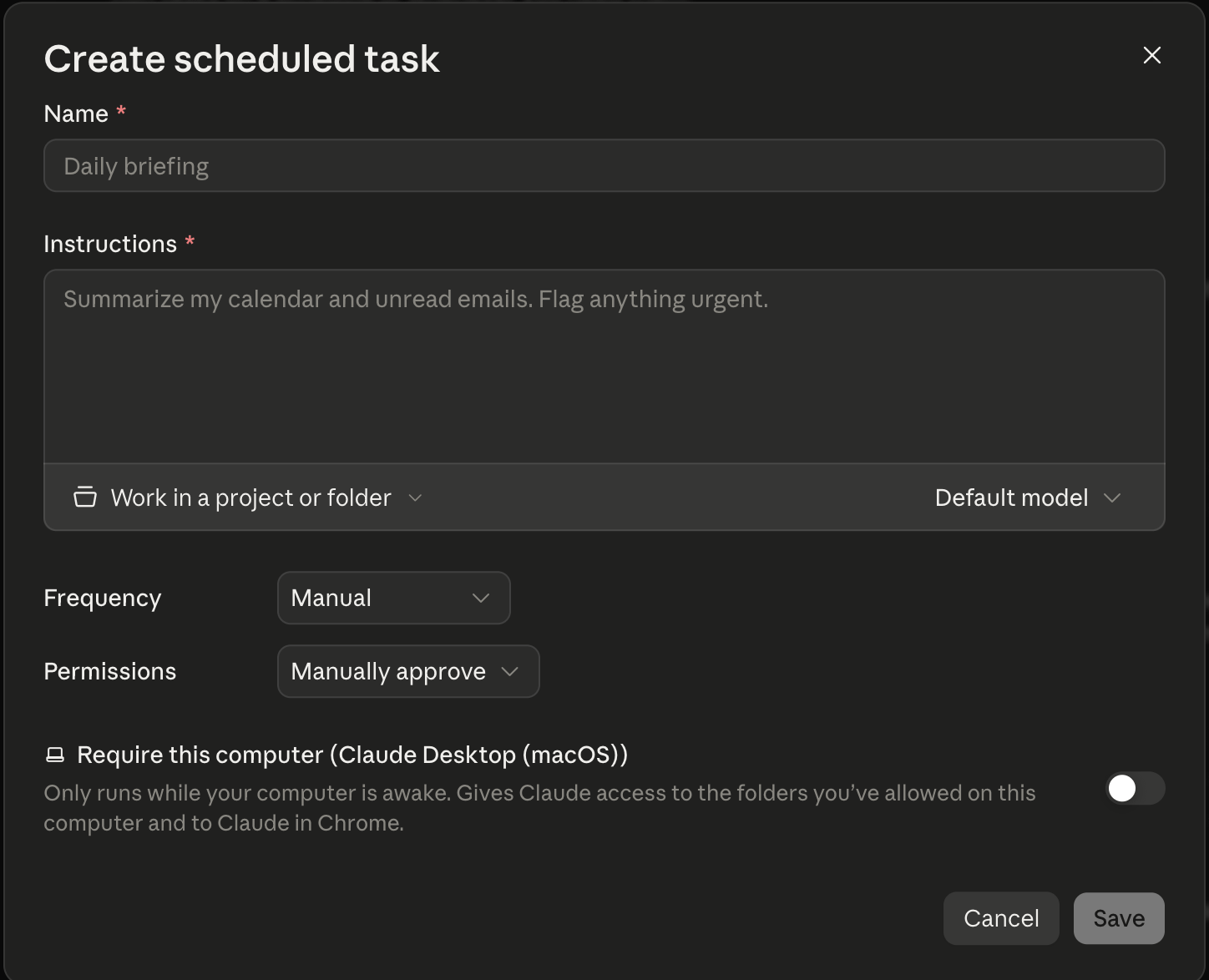
There are six fields to fill out:
Task name: just a name for the task that makes it easily recognizable
Instructions: A scheduled task runs with no conversation around it, so it’s really important to be clear on exactly what you need the task to do including
What the task is
What the process of the task is
The goal of the task
The ideal outcome(s) of the task
Approval mode: If the task only reads things and writes you a summary, automatic is fine. If it could send or post anything, keep it on manual or ask it to simply draft it in the instructions until you review the output and feel comfortable with setting it to automatic
Frequency: This is up to you and how often you want the task to run, depending on what you need it to do
Model: Go for a lighter model (ex: Haiku) for gathering and summarizing, versus a heavier model (ex: Sonnet, Opus) for anything where it needs to reason across a lot of material
Working folder (optional): Only fill this in when the task needs files from your computer
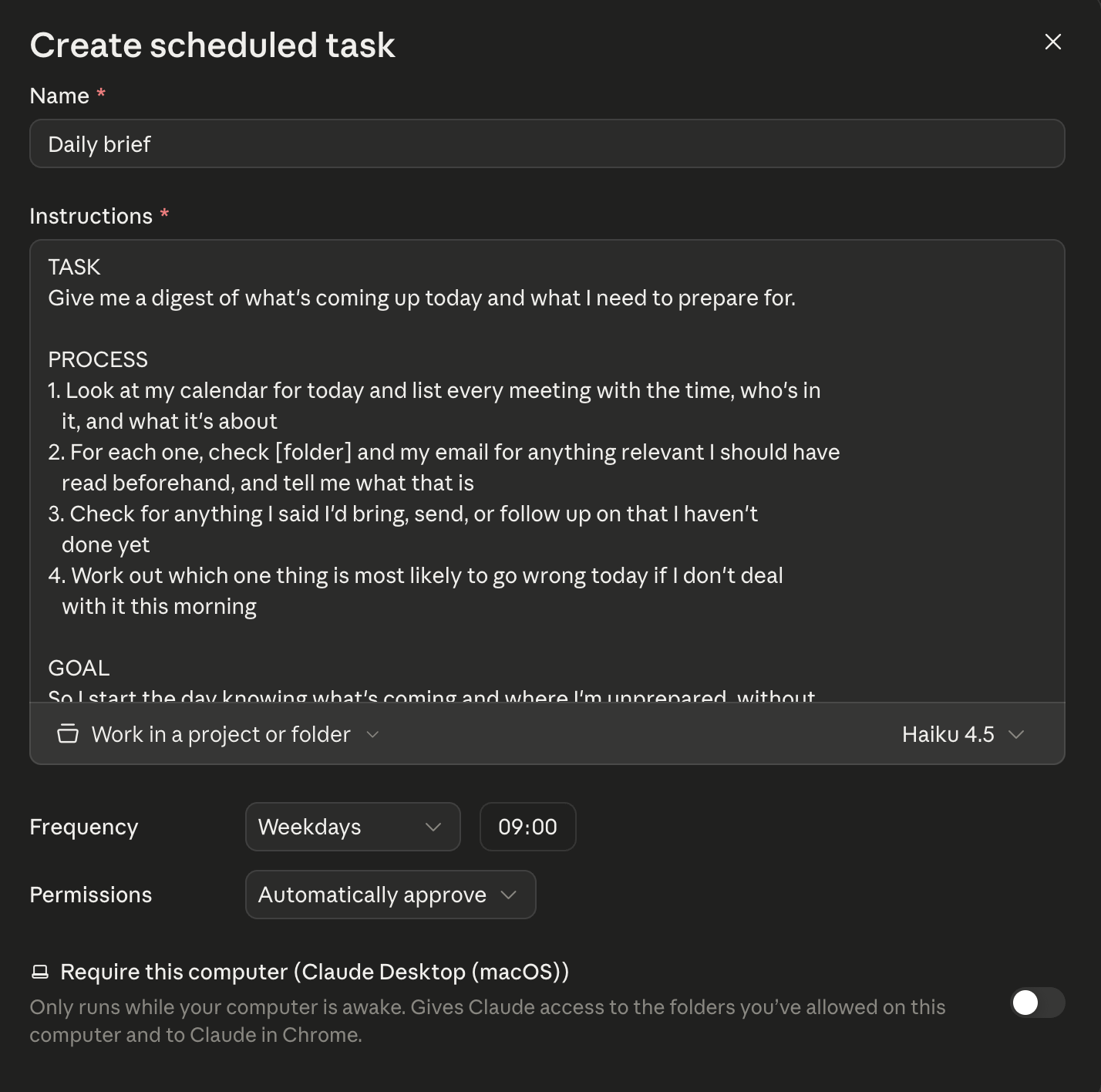
Here’s that first one from my list:
Task name: Daily digest
Instructions:
TASK
Give me a digest of what's coming up today and what I need to prepare for.

PROCESS
1. Look at my calendar for today and list every meeting with the time, who's in
   it, and what it's about
2. For each one, check my email and Slack for anything relevant I should have
   read beforehand, and tell me what that is
3. Check for anything I said I'd bring, send, or follow up on that I haven't
   done yet
4. Work out which one thing is most likely to go wrong today if I don't deal
   with it this morning

GOAL
So I start the day knowing what's coming and where I'm unprepared, without
opening five tabs to work it out myself.

IDEAL OUTCOME
Under a page. Meetings in time order with the prep notes underneath each one.
Outstanding commitments in their own short list. The one thing to deal with this
morning at the end.
Approval mode: automatic
Frequency: weekdays
Model: Haiku 4.5
Once you save the task, you can click into it for more detail:
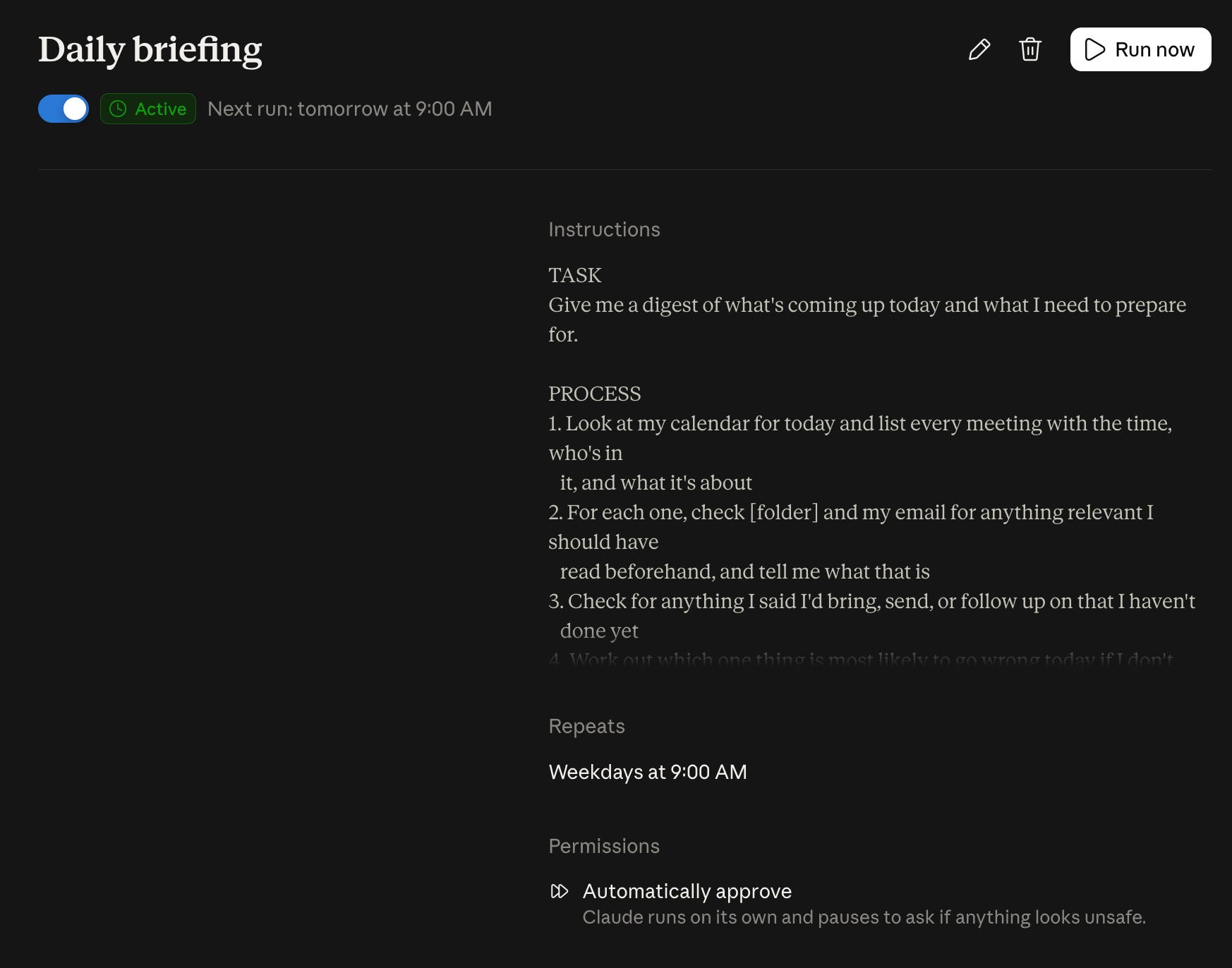
In this, you can edit the task, delete the task, pause the task, or run it manually. Please run the task manually first, look at what comes back, fix the prompt, and only then schedule it. Sometimes these tasks aren’t always right the first time we set it up, so it’s important to review the output and make sure it is exactly what you want before you allow it to start pinging Slack on your behalf.
When setting it up with Claude, you go through the same process except that when you click “create with Claude” it will automatically open a new chat and ask you some questions.
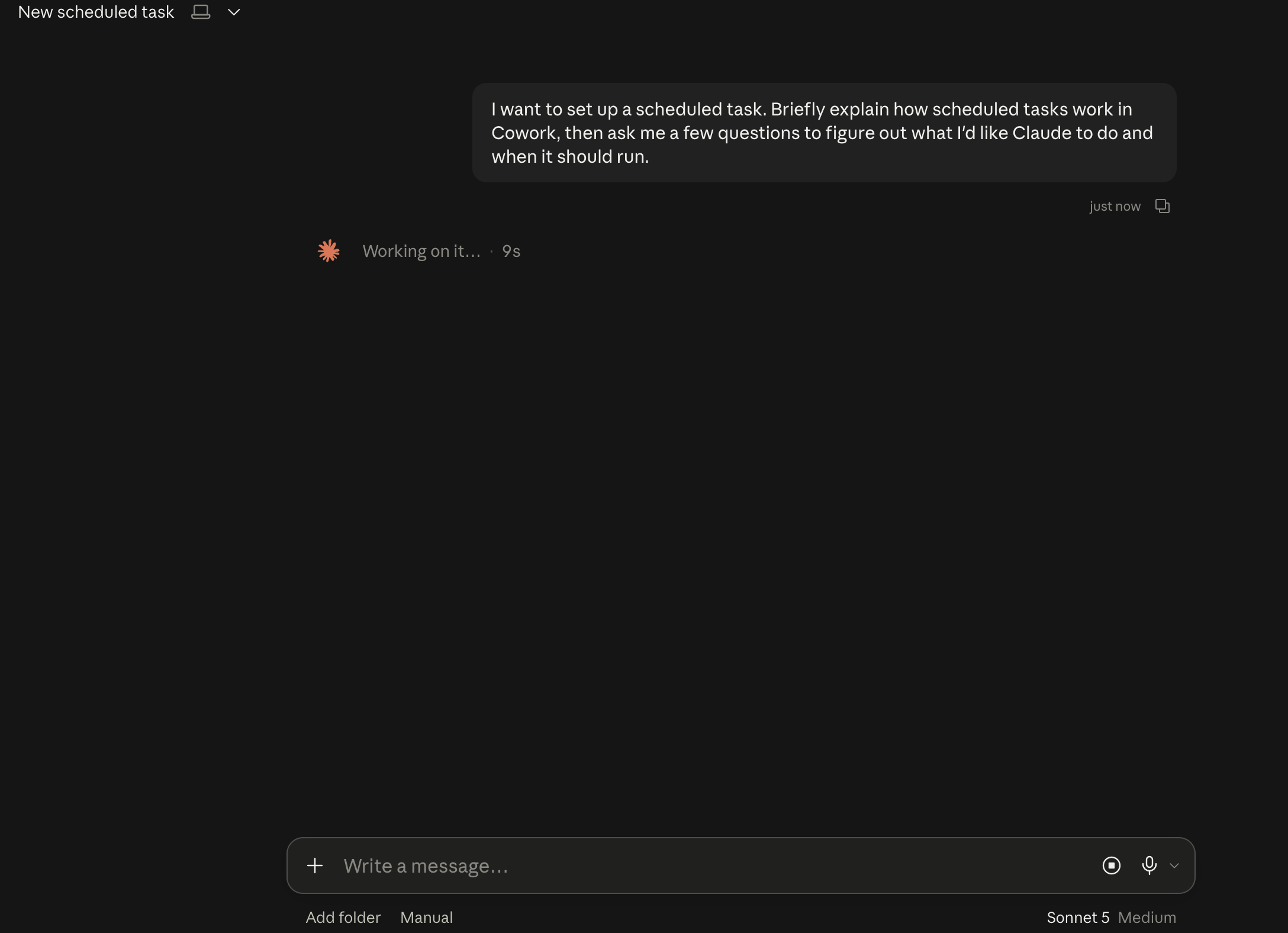
I “x” out of the questions and first I set the model to Haiku since it doesn’t need Sonnet to do the work. You can then use this prompt to help you with creating the scheduled task with Claude:
I want to schedule a task that [what it should do], running [cadence].

Before you write the instructions, interview me on four things: what the task actually
is, what the process of the task should be step by step, the goal of the task
and why I want it at all, and what the ideal outcome looks like when it lands.

Push me on the last two, since I'll skip them and then wonder why the output is
technically right and useless to me.

Then write the instructions with those four as headings, and make it completely
self-contained, since it runs without me there to explain anything or answer a
question.
There's also a third route you can use, which is doing the task by hand in a normal Cowork session, getting the output exactly right, and then asking Claude to create a scheduled task of it based on the conversation you had.
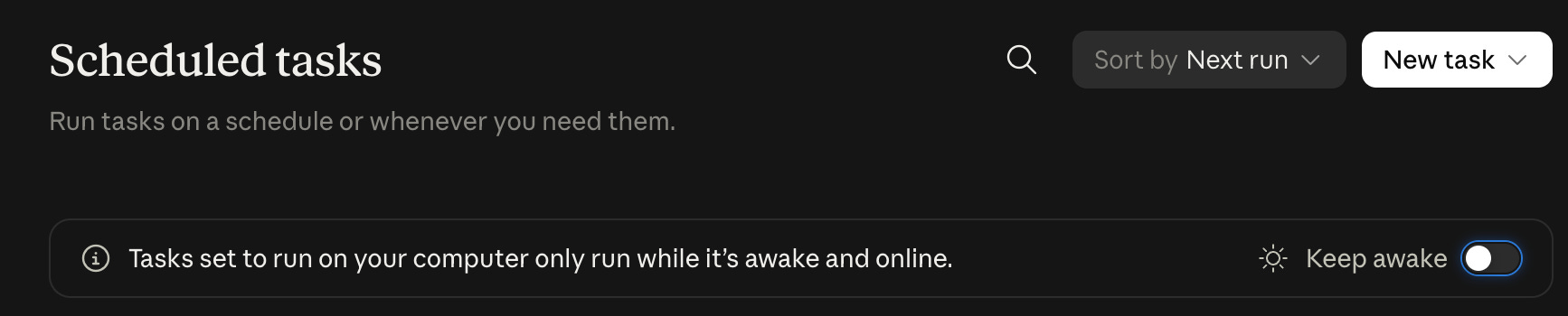
Some scheduled tasks run remotely, so they go at their set time whether or not your computer is on, unless they need access to local folders. A task that needs local files will only run when you're there, so don’t expect it to run something at five in the morning if you and your computer are asleep and it needs access to local files.
You can keep your computer awake using this toggle, but if you close your computer or it falls asleep, the local task might not run.
Where to start
There’s a lot in here. I know, it took me a few weeks to write :D and months to do myself. If I had to tell you with the two most important things to start with are:
Creating your context documents so you don’t have to re-explain everything to Claude every second
Putting your knowledge into key skills for mechanical tasks that take up a lot of your time
That is that, and the rest of this is for you to explore over time. Context and skills are going to up-level your Claude usage immensely, and you will reap the benefits of those over time.
I hope this has been helpful! If you are struggling, you can check out my CoworkOS, a research operating system for Claude, which helps you set up folders, skills, documentation, agents, scheduled tasks, and MCPs, so you can dive into Claude doing your best work.
Enjoy setting up Claude and making your life easier!
Stay curious,
Nikki